Security: authentication, authorization & identity
Master AuthN, AuthZ, RBAC, ABAC, OAuth 2.0, SSO, MFA, M2M auth, mTLS, and Zero Trust so you can design secure systems that interviewers respect and production demands.
TL;DR
- Authentication (AuthN) verifies who you are. Authorization (AuthZ) decides what you can do. Every security discussion starts with this distinction — conflating them is the most common mistake in interviews.
- Sessions store state on the server (simple, revocable); Tokens (JWT) store state on the client (stateless, scalable). The trade-off is instant revocation vs. horizontal scalability.
- RBAC assigns permissions to roles. ABAC evaluates attributes at runtime. PBAC externalizes policy as code. Choose based on how dynamic your access rules are — RBAC for most apps, ABAC/PBAC for enterprise-grade fine-grained control.
- OAuth 2.0 is an authorization framework (not authentication). OpenID Connect (OIDC) adds authentication on top. SAML is the enterprise legacy. SSO ties them together so users log in once.
- M2M (machine-to-machine) auth uses API keys, client credentials, or mTLS — never user passwords. MFA adds a second proof factor. Zero Trust assumes every network is hostile. All three are expected knowledge at senior/staff level.
The Problem It Solves
It's 2:47 a.m. Your team's Slack explodes. Someone scraped your internal /admin/users endpoint — no auth check, just a public URL that returned every user record in JSON. Names, emails, hashed passwords, subscription tiers. 4.2 million rows. It's on Hacker News by 6 a.m.
The root cause wasn't a sophisticated attack. There was no SQL injection, no zero-day exploit. An engineer added the admin endpoint during a sprint, forgot the auth middleware, and it shipped to production behind a URL nobody thought to protect.
I've seen this exact pattern play out three times in my career. The common thread isn't incompetence — it's treating security as an afterthought instead of a first-class architectural concern. The endpoint worked perfectly. It just worked for everyone, including attackers.
Security is not a feature you add — it's a property your system either has or doesn't
The most dangerous security bugs aren't the complex ones. They're the missing ones — the endpoint with no auth check, the admin panel with no role verification, the API key hardcoded in a frontend bundle. In interviews, showing that you think about security from the start (not as a "we'll add it later" footnote) immediately signals seniority.
The fix isn't complicated — it's systematic. Authentication at the gateway. Authorization on every resource. Identity verified at every layer. The rest of this article is how to build that system.
What Is It?
Security in system design is the set of mechanisms that control who gets in, what they can do, and how you verify both — continuously, at every layer of your architecture.
Analogy: Think of a large corporate office building. Authentication is the lobby security guard who checks your ID badge — verifying you are who you claim to be. Authorization is the keycard system on each floor — your badge works on floors 3 and 4 but not floor 7 (the executive suite). Identity is your employee record in HR — the source of truth about who you are and what department you belong to.
Multi-factor authentication is the guard checking your badge and asking you to enter a PIN. SSO is having one badge that works across all three office buildings in the campus. And Zero Trust is the building that checks your badge at every door, not just the lobby — because it doesn't trust that the lobby guard caught everything.
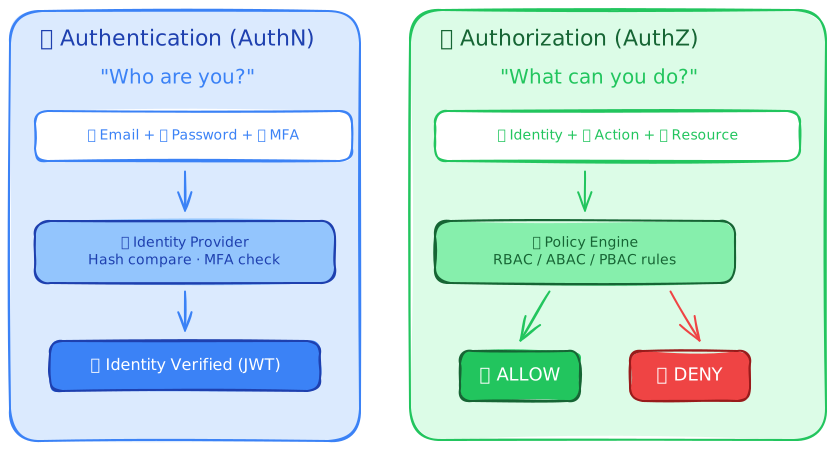
For your interview: when you add a security layer to your design, explicitly say "authentication at the gateway, authorization at the service level." That single sentence shows you understand the separation — and most candidates don't make it.
How It Works
Let's trace a single authenticated API request from login to response. This is the flow that every secure system implements — the details vary, but the stages don't.
Here's what happened at each phase:
-
Authentication — The user proves their identity by providing credentials (password) and a second factor (MFA code). The Identity Provider verifies both and issues a signed JWT access token plus a refresh token.
-
Token validation — The API Gateway validates the JWT's cryptographic signature (is this token genuine?), checks the expiry claim (is it still valid?), and extracts the user's identity and roles from the token claims. No database lookup required — the token is self-contained.
-
Authorization — The application service consults a policy engine to determine whether this specific user, with these specific roles, can perform this specific action. The policy engine evaluates rules and returns allow or deny.
-
Data access — If authorized, the service queries the database with appropriate row-level filtering. The user only sees data they're allowed to see — not just endpoints they're allowed to hit.
// Middleware chain showing the security pipeline
async function handleRequest(req: Request): Promise<Response> {
  // Step 1: Extract and validate the JWT
  const token = req.headers.get('Authorization')?.replace('Bearer ', '');
  if (!token) return new Response('Unauthorized', { status: 401 });

  const claims = await verifyJWT(token); // Validates signature + expiry
  if (!claims) return new Response('Invalid token', { status: 401 });

  // Step 2: Authorization — check if this user can perform this action
  const allowed = await policyEngine.evaluate({
    subject: { id: claims.sub, roles: claims.roles },
    action: req.method,
    resource: req.url,
  });
  if (!allowed) return new Response('Forbidden', { status: 403 });

  // Step 3: Pass verified identity to the handler
  req.userId = claims.sub;
  req.orgId = claims.org_id;
  return routeHandler(req);
}
401 vs 403 — know the difference
401 Unauthorized means "I don't know who you are" — the request lacks valid authentication credentials. 403 Forbidden means "I know who you are, but you can't do this" — authenticated but not authorized. Mixing these up in an interview is a small but telling error. 401 = AuthN failure. 403 = AuthZ failure.
The key insight: authentication happens once (at login), but authorization happens on every single request. Your auth token proves identity; your policy engine proves permission. Both are required, and they're different systems.
Key Components
| Component | Role |
|---|---|
| Identity Provider (IdP) | Central service that authenticates users and issues tokens. Examples: Auth0, Okta, AWS Cognito, Keycloak. Never build your own unless you have a dedicated security team. |
| JWT (JSON Web Token) | Self-contained signed token carrying user claims (ID, roles, expiry). Verified without a database lookup — the signature proves authenticity. |
| API Gateway | Entry point that validates tokens, rate-limits, and routes requests. Authentication enforcement lives here so individual services don't repeat it. |
| Policy Engine | Evaluates authorization rules against the request context. OPA (Open Policy Agent), Cedar, or custom RBAC middleware. Externalizing policy from code is the key to maintainable authorization. |
| Refresh Token | Long-lived token used to obtain new access tokens without re-authentication. Stored securely server-side. Enables short-lived access tokens (5–15 min) without forcing frequent logins. |
| MFA (Multi-Factor Auth) | Requires two or more proof factors: something you know (password), something you have (phone/TOTP), something you are (biometric). Blocks 99.9% of credential-stuffing attacks. |
| TLS/mTLS | TLS encrypts data in transit (one-way: server proves identity). mTLS is mutual — both sides present certificates. Used for service-to-service authentication in microservices. |
| Secrets Manager | Centralized, encrypted storage for API keys, database credentials, and certificates. AWS Secrets Manager, HashiCorp Vault, GCP Secret Manager. Never store secrets in code or environment variables. |
Authentication (AuthN)
Authentication answers one question: are you who you claim to be? Everything else in security depends on getting this right. If your authentication is broken, your authorization doesn't matter — an attacker with a forged identity bypasses every permission check.
Password-Based Authentication
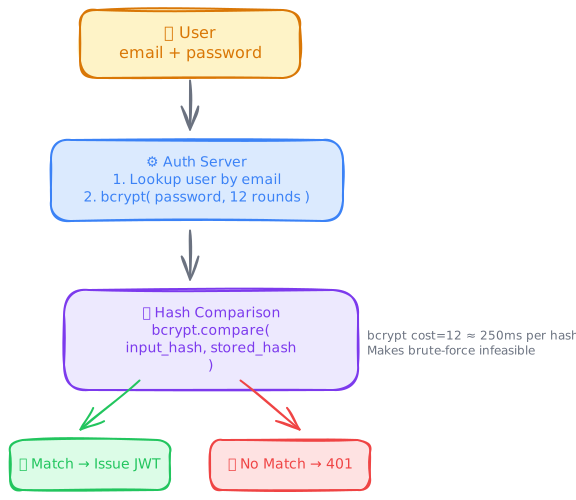
The oldest and most common method. User provides an identifier (email/username) and a secret (password). The server compares a hash of the provided password against the stored hash.
import { hash, compare } from 'bcrypt';

const BCRYPT_ROUNDS = 12; // ~250ms per hash — intentionally slow

async function registerUser(email: string, password: string): Promise<void> {
  // Never store plaintext passwords. bcrypt includes a built-in salt.
  const passwordHash = await hash(password, BCRYPT_ROUNDS);
  await db.query(
    'INSERT INTO users (email, password_hash) VALUES ($1, $2)',
    [email, passwordHash]
  );
}

async function authenticateUser(email: string, password: string): Promise<User | null> {
  const user = await db.queryOne('SELECT * FROM users WHERE email = $1', [email]);
  if (!user) return null; // Don't reveal whether the email exists

  const valid = await compare(password, user.password_hash);
  return valid ? user : null; // Same response for wrong email and wrong password
}
What most people get wrong: Returning different error messages for "email not found" vs. "wrong password" leaks information about which emails are registered. Always return the same generic error: "Invalid email or password."
My recommendation: don't build password authentication yourself unless you have a dedicated security team. Use an Identity Provider (Auth0, Clerk, Cognito) that handles hashing, salting, breach detection, and credential stuffing protection out of the box.
Session-Based Authentication
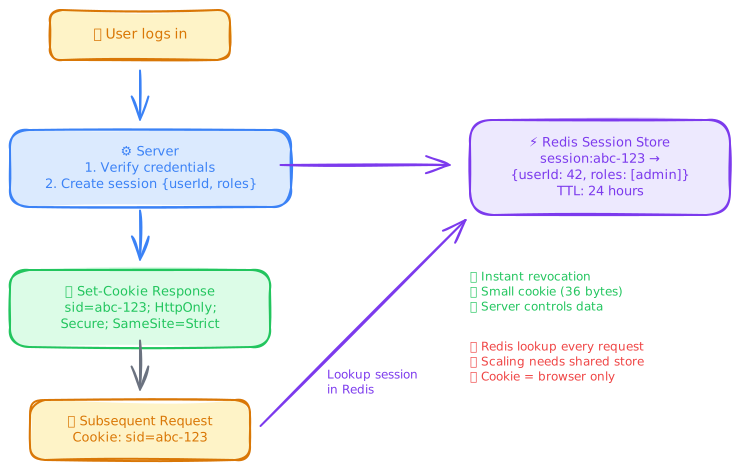
After verifying credentials, the server creates a session — a record stored on the server that maps a random session ID to the user's identity. The session ID is sent to the client as a cookie and included in every subsequent request.
// Login: create a session
async function login(req: Request): Promise<Response> {
  const user = await authenticateUser(req.body.email, req.body.password);
  if (!user) return new Response('Invalid credentials', { status: 401 });

  // Generate a cryptographically random session ID
  const sessionId = crypto.randomUUID();

  // Store session server-side (Redis for multi-server setups)
  await redis.set(`session:${sessionId}`, JSON.stringify({
    userId: user.id,
    roles: user.roles,
    createdAt: Date.now(),
  }), { EX: 86400 }); // 24-hour expiry

  // Set HTTP-only, secure cookie — not accessible via JavaScript
  const response = new Response('OK');
  response.headers.set('Set-Cookie',
    `sid=${sessionId}; HttpOnly; Secure; SameSite=Strict; Path=/; Max-Age=86400`
  );
  return response;
}
Session advantages: Instant revocation (delete the session from Redis and the user is logged out immediately). Small cookie size (just a random ID, not a full token). Server controls the data — nothing sensitive is stored on the client.
Session disadvantages: Every request requires a session store lookup. Horizontal scaling requires a centralized session store (Redis). Mobile apps prefer tokens over cookies. Cross-domain doesn't work well with cookies (SameSite restrictions).
For your interview: sessions are the right choice for traditional web apps with server-rendered pages. Tokens (JWT) are the right choice for SPAs, mobile apps, and microservices.
Token-Based Authentication (JWT)
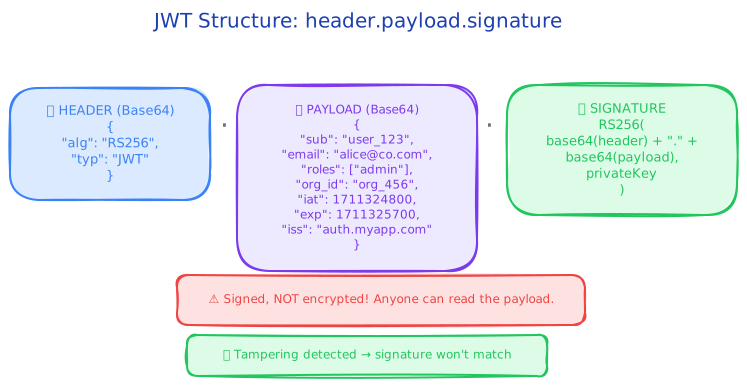
A JSON Web Token (JWT) is a self-contained, cryptographically signed token that carries the user's identity and claims. The server verifies the token by checking the signature — no database or session store lookup required.
// JWT structure: header.payload.signature
// Example decoded JWT:
const header = {
  alg: 'RS256',    // RSA signature — use asymmetric keys in production
  typ: 'JWT',
};

const payload = {
  sub: 'user_123',           // Subject — the user ID
  email: 'alice@example.com',
  roles: ['manager', 'user'],
  org_id: 'org_456',
  iat: 1711324800,           // Issued at
  exp: 1711325700,           // Expires in 15 minutes
  iss: 'auth.myapp.com',     // Issuer
  aud: 'api.myapp.com',      // Audience — intended recipient
};
// Signature = RS256(base64(header) + "." + base64(payload), privateKey)
JWT advantages: Stateless verification — no database lookup, no session store. Works across domains (no cookie restrictions). Carries custom claims (roles, org_id, permissions). Scales horizontally without shared state.
JWT disadvantages: Cannot be revoked until expiry (the token is self-contained — there's no server-side record to delete). Larger than session cookies (a typical JWT is 500–1000 bytes vs. 36 bytes for a UUID session ID). Sensitive claims are visible to anyone who Base64-decodes the payload (not encrypted, just signed).
JWTs are signed, not encrypted — never put secrets in them
A common mistake: putting sensitive data (SSN, credit card info, internal IDs) in JWT claims. JWTs are Base64-encoded, not encrypted — anyone can decode and read the payload. The signature prevents tampering, not reading. If you need to hide claims, use JWE (JSON Web Encryption) — but the simpler approach is to keep tokens lean and fetch sensitive data server-side.
The real-world pattern is short-lived access tokens (5–15 minutes) paired with long-lived refresh tokens (7–30 days). The short access token TTL limits the damage window if a token leaks. The refresh token lives server-side and can be revoked instantly.
Token Lifecycle: Access and Refresh Tokens
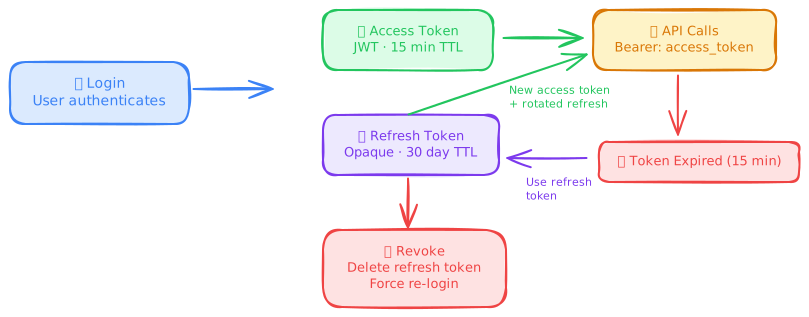
Refresh token rotation is critical: every time a refresh token is used, the old one is invalidated and a new one is issued. If an attacker steals a refresh token and the legitimate user also uses it, the reuse triggers an alert and both tokens are revoked. This is called automatic reuse detection.
For your interview: "Access tokens are 15-minute JWTs verified at the gateway. Refresh tokens are opaque, stored server-side in Redis, and rotated on every use. Revocation is instant by deleting the refresh token." That's the complete answer.
Multi-Factor Authentication (MFA)
MFA requires users to prove their identity with two or more independent factors from different categories. Even if an attacker steals a password, they can't authenticate without the second factor.
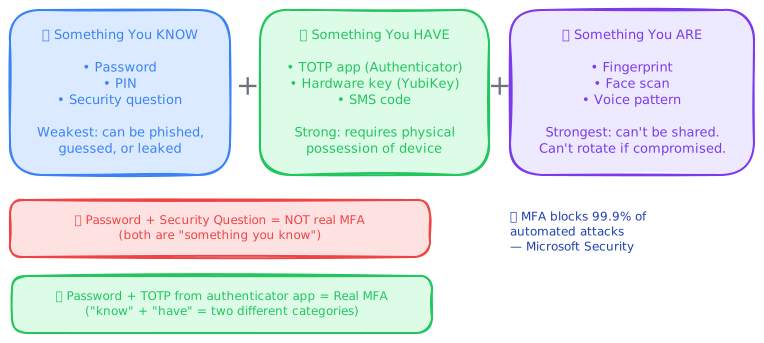
The three factor categories:
| Factor | Examples | Strength |
|---|---|---|
| Something you know | Password, PIN, security question | Weakest — can be phished, guessed, or leaked in breaches |
| Something you have | TOTP app (Google Authenticator), SMS code, hardware key (YubiKey) | Strong — requires physical possession. Hardware keys are phishing-resistant. |
| Something you are | Fingerprint, face scan, voice pattern | Strongest — can't be shared. But can't be rotated if compromised (you can't change your fingerprint). |
// TOTP (Time-based One-Time Password) verification
import { authenticator } from 'otplib';

// During MFA enrollment: generate and store a secret per user
const secret = authenticator.generateSecret(); // e.g., "JBSWY3DPEHPK3PXP"
// Show user a QR code encoding: otpauth://totp/MyApp:alice?secret=JBSWY3DPEHPK3PXP

// During login: verify the 6-digit code from the user's authenticator app
function verifyTOTP(userSecret: string, code: string): boolean {
  return authenticator.verify({ token: code, secret: userSecret });
  // TOTP codes are valid for 30-second windows
  // Most implementations accept ±1 window for clock drift
}
Interview tip: the MFA number that wins arguments
Microsoft reports that MFA blocks 99.9% of automated credential-stuffing attacks. When you add MFA to your design, say the number: "MFA blocks 99.9% of automated attacks." A single statistic delivered with confidence is more persuasive than three paragraphs of explanation.
The bottom line: MFA is table stakes for any system handling user data. If your design doesn't include MFA for admin accounts, you've left the biggest door open.
Passwordless Authentication (WebAuthn / FIDO2)
WebAuthn eliminates passwords entirely by using public-key cryptography. Instead of "something you know" (a password that can be phished), it uses "something you have" (a hardware key or device biometric) to generate a cryptographic proof.
Passwordless is where authentication is heading. For interviews, know it exists and the basic mechanism — you won't need to implement it in a design, but mentioning it as a future-proof choice scores points.
Authorization (AuthZ)
Authentication proved who the user is; authorization decides what they can do. This is where most systems get complex and most security bugs live. A mis-configured authorization rule silently grants access to data the user should never see.
So when does authorization actually matter in an interview? Every time. If you design a system without mentioning authorization, you've designed a system where every authenticated user can do everything. That's not a system — that's a liability.
Access Control Lists (ACL)
The simplest model. Each resource has a list of who can access it and how.
// ACL: explicit per-resource permissions
const fileACL = {
  'doc_001': [
    { userId: 'alice', permissions: ['read', 'write', 'delete'] },
    { userId: 'bob', permissions: ['read'] },
    { userId: 'charlie', permissions: ['read', 'write'] },
  ],
};
ACLs work for small systems with few resources. They collapse under scale: 10,000 users × 50,000 documents = 500 million ACL entries to manage. This is why Google Drive uses ACLs combined with inheritance (folder permissions cascade to files) — pure flat ACLs would be unmanageable.
ACLs are the right tool when you need per-resource, per-user granularity and the number of resources is bounded. For most applications, you want a model that abstracts away individual user-resource mappings.
Role-Based Access Control (RBAC)
RBAC groups permissions into roles, and assigns roles to users. Instead of "Alice can read orders, write orders, read reports," you define roles like order_manager (can read/write orders) and analyst (can read reports), then assign Alice both roles.
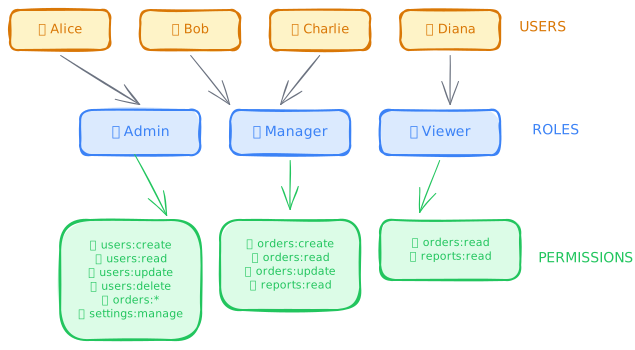
// RBAC implementation — simple and effective
type Role = 'admin' | 'manager' | 'analyst' | 'viewer';

const rolePermissions: Record<Role, Set<string>> = {
  admin:   new Set(['users:create', 'users:read', 'users:update', 'users:delete',
                    'orders:create', 'orders:read', 'orders:update', 'orders:delete',
                    'reports:read', 'reports:export', 'settings:manage']),
  manager: new Set(['orders:create', 'orders:read', 'orders:update',
                    'reports:read', 'reports:export']),
  analyst: new Set(['orders:read', 'reports:read', 'reports:export']),
  viewer:  new Set(['orders:read', 'reports:read']),
};

function authorize(userRoles: Role[], requiredPermission: string): boolean {
  return userRoles.some(role => rolePermissions[role]?.has(requiredPermission));
}

// Usage in middleware
if (!authorize(req.user.roles, 'orders:update')) {
  return new Response('Forbidden', { status: 403 });
}
RBAC strengths: Simple mental model. Easy to audit (list all permissions for a role in one query). Maps naturally to org charts. Supported by every identity provider. Scales well up to ~50 roles.
RBAC limitations: Role explosion — when you need "manager who can only see orders in the EU region," you create manager_eu, manager_us, manager_apac. At 20 regions × 10 base roles = 200 roles. This is where RBAC breaks down and you need attribute-based control.
My recommendation: RBAC is correct for 80% of applications. Start with RBAC. Move to ABAC only when you have evidence that role explosion is happening — not as a preemptive measure.
Attribute-Based Access Control (ABAC)
ABAC evaluates access decisions based on attributes of the subject, resource, action, and environment — not just the user's role. The policy engine evaluates a rule like "allow if user.department == resource.department AND user.clearance >= resource.classification AND time.hour is between 9 and 17."
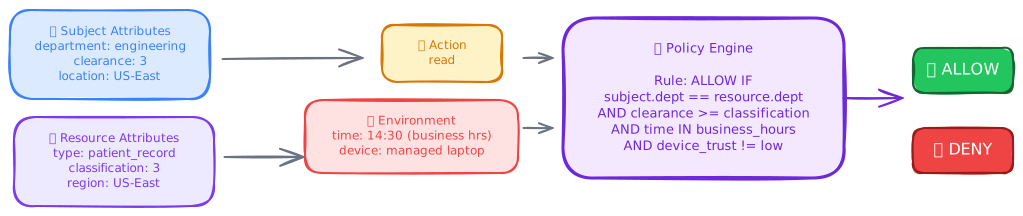
// ABAC policy evaluation
interface ABACContext {
  subject: { id: string; department: string; clearance: number; location: string };
  resource: { id: string; department: string; classification: number; type: string };
  action: 'read' | 'write' | 'delete';
  environment: { time: Date; ipAddress: string; deviceTrust: 'high' | 'medium' | 'low' };
}

function evaluatePolicy(ctx: ABACContext): boolean {
  // Rule: Users can read resources in their own department
  // if their clearance meets or exceeds the resource classification
  // and the request comes from a trusted device
  if (ctx.action === 'read') {
    return (
      ctx.subject.department === ctx.resource.department &&
      ctx.subject.clearance >= ctx.resource.classification &&
      ctx.environment.deviceTrust !== 'low'
    );
  }

  // Rule: Only writes from the corporate network during business hours
  if (ctx.action === 'write') {
    const hour = ctx.environment.time.getHours();
    return (
      ctx.subject.department === ctx.resource.department &&
      ctx.subject.clearance >= ctx.resource.classification &&
      hour >= 9 && hour <= 17 &&
      ctx.environment.ipAddress.startsWith('10.0.') // Corporate network
    );
  }

  return false;
}
ABAC strengths: Eliminates role explosion. Supports arbitrarily complex rules. Can incorporate environmental context (time, location, device trust). Single rule can cover millions of user-resource combinations.
ABAC weaknesses: Hard to audit ("why was this request denied?" requires evaluating the full rule). Complex to implement and test. Policies can conflict. Performance overhead — every rule evaluation requires attribute lookups.
Policy-Based Access Control (PBAC)
PBAC is ABAC with the policies externalized into a dedicated policy engine and written in a policy language. Instead of hardcoding rules in your application, you write policies in a language like Rego (OPA), Cedar (AWS), or Casbin configuration — and the application delegates all authorization decisions to the policy engine.
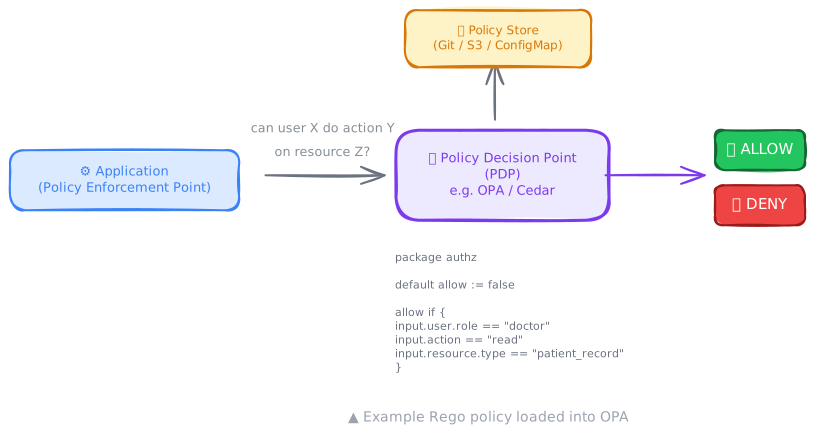
# OPA (Open Policy Agent) policy in Rego language
package authz

# Allow managers to read any order in their region
allow {
    input.action == "read"
    input.resource.type == "order"
    some role in input.subject.roles
    role == "manager"
    input.subject.region == input.resource.region
}

# Allow admins to do anything
allow {
    some role in input.subject.roles
    role == "admin"
}

# Deny access to PII outside business hours
deny {
    input.resource.classification == "pii"
    hour := time.clock(time.now_ns())[0]
    hour < 9
}
deny {
    input.resource.classification == "pii"
    hour := time.clock(time.now_ns())[0]
    hour > 17
}
The killer feature of PBAC: Policy as code. Policies live in version control, can be unit-tested, go through code review, and deploy independently of the application. When compliance asks "show me who can access PII," you diff the policy file — not audit 500 microservices.
For your interview: if the system involves compliance requirements (HIPAA, SOX, GDPR), mention PBAC with OPA or Cedar. "We'd externalize authorization to OPA so policies are version-controlled and auditable independently of application deployments." That's a staff-level answer.
Relationship-Based Access Control (ReBAC)
ReBAC determines access based on the relationship between the user and the resource in a graph. Google Docs uses ReBAC: you can access a document if you're its owner, or if the owner shared it with you, or if it's in a folder shared with a group you belong to.
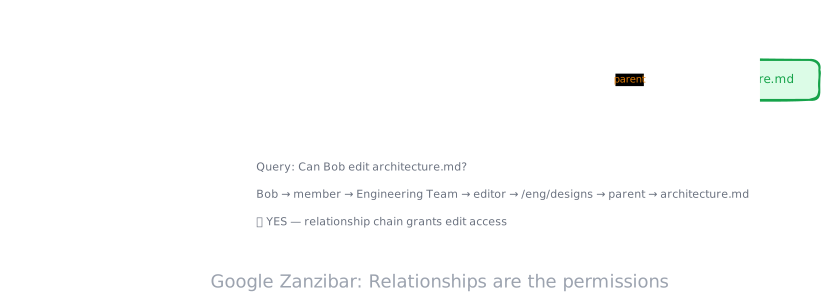
ReBAC is the right model for collaborative applications where sharing, ownership, and group membership create dynamic access patterns. If your users share resources with each other, you need ReBAC — even if you don't call it that.
Choosing Your Authorization Model
Here's the honest answer about which model to use. Don't overthink this — the right model falls out of your requirements.
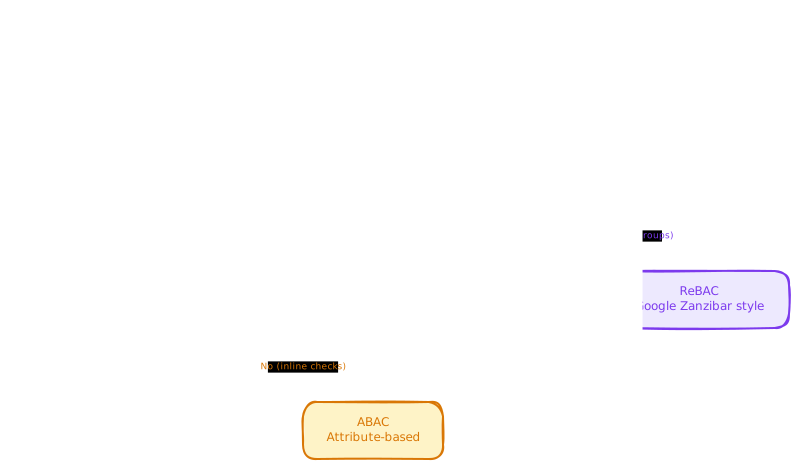
| Requirements | Model | Why |
|---|---|---|
| Simple app, < 30 roles, no sharing | RBAC | Simple, auditable, every IdP supports it |
| Users share resources (docs, folders, projects) | ReBAC | Access is defined by relationships, not global roles |
| Compliance-driven, many attributes, regulatory audit | ABAC / PBAC | Policy-as-code enables audit trails and compliance reporting |
| Per-resource, per-user granularity, small scale | ACL | Direct mapping, no abstraction needed |
| Enterprise with RBAC role explosion | ABAC | Attributes replace combinatorial role creation |
If you're unsure, start with RBAC and migrate when it hurts. Every other model adds complexity — you should feel the pain before paying the cost.
Identity & Access Management
Identity is the foundation everything else builds on. Authentication proves identity. Authorization uses identity. But where does identity live, how is it managed, and how do you avoid making users log in separately to every service?
Single Sign-On (SSO)
SSO lets users authenticate once and access multiple applications without re-entering credentials. When you log into Google and then open Gmail, YouTube, and Google Docs without logging in again — that's SSO.
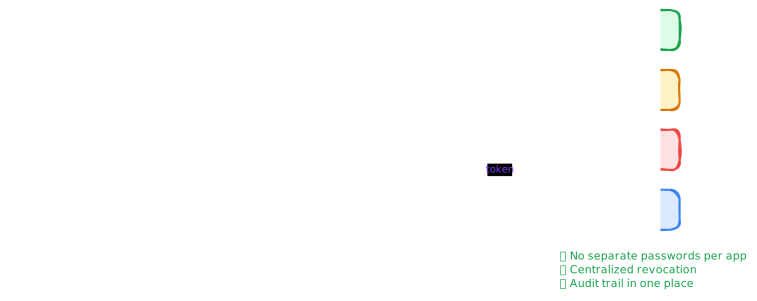
How SSO works under the hood: When the user first logs in, the IdP creates a session (usually a cookie on the IdP's domain). When the user navigates to a second application, that app redirects to the same IdP. The IdP sees the existing session cookie and immediately redirects back with an authorization code — no login prompt. The user experiences this as "I just went to the app and I was already logged in."
For your interview: "We'd implement SSO via OIDC with our Identity Provider so users authenticate once and get tokens accepted by all internal services." That demonstrates you treat identity as a centralized concern, not a per-service problem.
SAML vs OpenID Connect (OIDC)
These are the two protocols that implement SSO. SAML is the enterprise legacy. OIDC is the modern standard. You'll encounter both, but for new systems, always default to OIDC.
| Dimension | SAML 2.0 | OpenID Connect (OIDC) |
|---|---|---|
| Era | 2005 — enterprise XML era | 2014 — mobile/API-first era |
| Data format | XML assertions | JSON Web Tokens (JWT) |
| Transport | HTTP POST/redirect with XML | HTTP with JSON + JWT |
| Best for | Enterprise apps, legacy systems | SPAs, mobile apps, APIs, modern web |
| Token size | Large (2–10 KB XML) | Small (500–1000 byte JWT) |
| Mobile support | Poor — XML parsing is heavy | Excellent — JSON-native |
| Built on | Its own protocol stack | OAuth 2.0 (adds identity layer) |
| Discovery | Metadata XML endpoint | .well-known/openid-configuration |
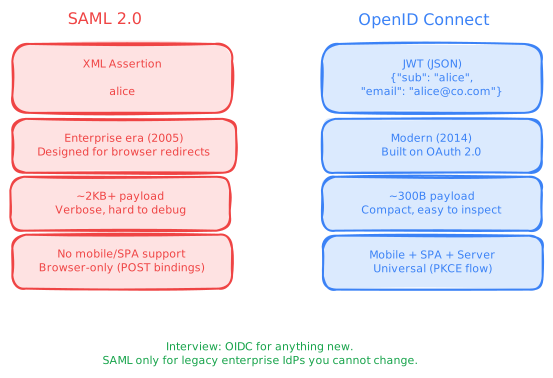
The rule of thumb: OIDC is the answer unless someone asks about SAML. If they do, you know both exist and why enterprises still need SAML.
Identity Federation
Federation allows users authenticated by one organization's IdP to access another organization's resources. When you click "Sign in with Google" on a third-party website, that's federation — Google acts as the identity provider, and the website accepts Google's assertion of your identity.
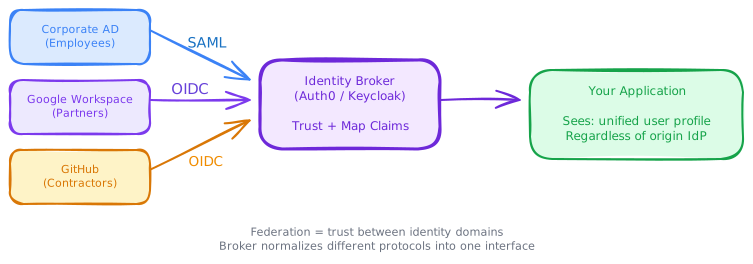
JIT (Just-In-Time) Provisioning: When a federated user logs in for the first time, the application automatically creates a local user record from the identity token's claims (name, email, groups). No manual account creation required. When the user's attributes change at the IdP (new role, new department), the next login updates the local record.
Identity federation is what makes "Sign in with Google/GitHub/Microsoft" work, and it's how enterprise customers integrate their corporate directory with your SaaS product. In interviews, mention it when discussing multi-tenant B2B systems.
OAuth 2.0 & OpenID Connect
OAuth 2.0 is the most misunderstood protocol in system design. Engineers routinely call it "authentication" — it's not. OAuth 2.0 is an authorization framework that lets a user grant a third-party application limited access to their resources without sharing their password.
OpenID Connect (OIDC) is a thin layer on top of OAuth 2.0 that adds authentication — it gives you a standardized way to learn who the user is, not just what they've authorized.
Here's the honest answer: you need both. OAuth 2.0 for authorization ("this app can read my Google Calendar"). OIDC for authentication ("this user is alice@google.com").
OAuth 2.0 Roles
| Role | Description | Example |
|---|---|---|
| Resource Owner | The user who owns the data | You — with your Google Calendar |
| Client | The third-party app requesting access | Zoom — wants to read your calendar |
| Authorization Server | Issues tokens after user consent | Google's auth server (accounts.google.com) |
| Resource Server | Hosts the protected data | Google Calendar API |
Authorization Code Flow + PKCE
This is the standard flow for web and mobile applications. It's the only flow you need to know for interviews. Implicit flow is deprecated. Client credentials is for M2M (covered later).
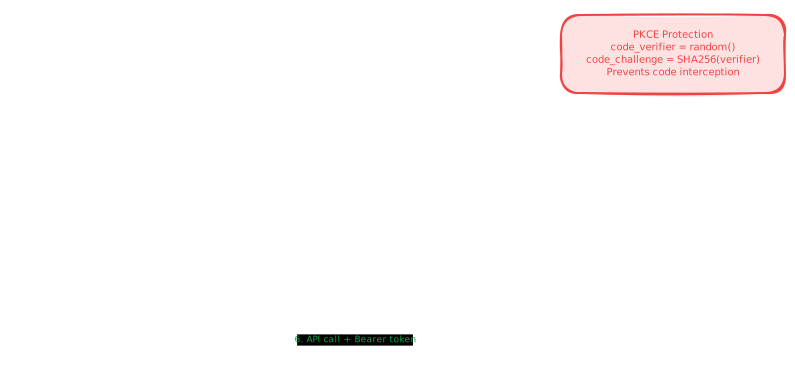
PKCE (Proof Key for Code Exchange): The client generates a random code_verifier and sends a SHA256 hash (code_challenge) in the initial authorization request. When exchanging the authorization code for tokens, the client sends the original code_verifier. The auth server verifies that SHA256(code_verifier) == stored_code_challenge. This prevents an attacker who intercepts the authorization code from exchanging it — they don't have the code_verifier.
OAuth 2.0 Scopes
Scopes limit what the access token can do. They're the mechanism for least-privilege access: the user grants only the specific permissions the app needs.
scope=calendar.read profile.email
The user sees: "Zoom wants to: Read your calendar events, View your email address." The user can grant or deny. The access token only works for those specific operations.
For your interview: always mention scopes when discussing OAuth. "The access token is scoped to orders:read — even if the token leaks, the attacker can only read orders, not create or delete them." Scopes are how you apply the principle of least privilege to tokens.
Machine-to-Machine (M2M) Authentication
Not all clients are humans. Services call other services. Cron jobs hit APIs. CI/CD pipelines deploy code. These machine clients need to authenticate — but they can't enter passwords or approve consent screens.
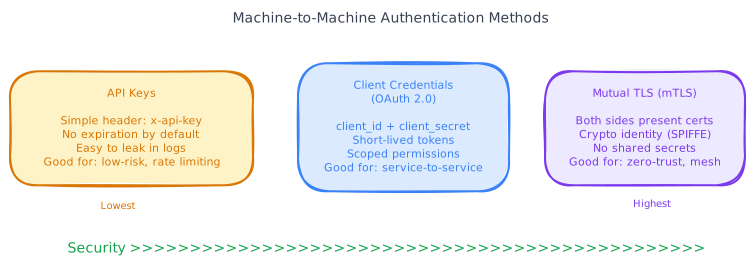
API Keys
The simplest M2M credential. A long random string that the client includes in every request. The server looks up the key and identifies the client.
// API Key validation
async function validateApiKey(req: Request): Promise<ServiceIdentity | null> {
  const key = req.headers.get('X-API-Key');
  if (!key) return null;

  // Look up the key hash — never store API keys in plaintext
  const keyHash = crypto.createHash('sha256').update(key).digest('hex');
  const service = await db.queryOne(
    'SELECT service_id, scopes, rate_limit FROM api_keys WHERE key_hash = $1 AND revoked = false',
    [keyHash]
  );
  return service;
}
API key strengths: Dead simple. No token exchange flow. Works everywhere (curl, Postman, any HTTP client). Easy to rotate by issuing a new key and revoking the old one.
API key weaknesses: Static — if leaked, it's valid until manually revoked. No expiry by default (you must build it). Can't carry claims or scopes without a database lookup. Every validation hits a database.
My recommendation: API keys are fine for low-sensitivity, external integrations (third-party webhooks, public APIs with rate limiting). For internal service-to-service auth, use client credentials or mTLS.
Client Credentials (OAuth 2.0)
The service authenticates directly with the authorization server using its own client_id and client_secret — no user involved. The auth server issues a short-lived access token.
// Client Credentials grant — service-to-service
const tokenResponse = await fetch('https://auth.company.com/oauth/token', {
  method: 'POST',
  headers: { 'Content-Type': 'application/x-www-form-urlencoded' },
  body: new URLSearchParams({
    grant_type: 'client_credentials',
    client_id: process.env.SERVICE_CLIENT_ID,
    client_secret: process.env.SERVICE_CLIENT_SECRET,
    scope: 'orders:read users:read',
  }),
});
const { access_token, expires_in } = await tokenResponse.json();
// access_token is a JWT valid for expires_in seconds (typically 3600)
// Cache it locally and refresh before expiry
Why this beats API keys: Tokens are short-lived (1 hour typical). Scopes limit access. Token format (JWT) enables stateless validation. The client_secret never leaves the service — unlike an API key which is sent on every request.
Mutual TLS (mTLS)
mTLS extends standard TLS by requiring both sides to present certificates. In standard HTTPS, only the server proves its identity. With mTLS, the client also presents a certificate, and the server verifies it against a trusted Certificate Authority (CA).
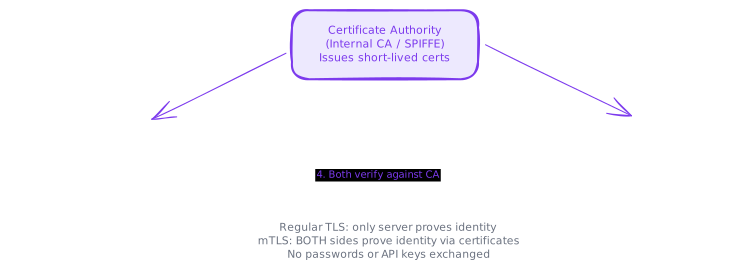
mTLS in service meshes: Istio and Linkerd automatically provision certificates for every service via SPIFFE (Secure Production Identity Framework for Everyone), inject sidecar proxies that handle the mTLS handshake, and rotate certificates every 24 hours — all without application code changes. Your services don't even know mTLS is happening.
For your interview: mTLS is the answer for service-to-service authentication in microservices. "Internal services authenticate via mTLS through the service mesh. No tokens to manage, no secrets to rotate — the mesh handles certificate lifecycle automatically." That's the level of answer that signals infrastructure maturity.
Choosing Your M2M Authentication
| Scenario | Method | Why |
|---|---|---|
| Third-party webhook integration | API Key | Simple, external partner can embed it |
| Internal service calling another service | mTLS (via service mesh) | Strongest guarantee, automated lifecycle |
| Service needing user-context tokens | Client Credentials (OAuth 2.0) | Scoped tokens, short-lived, JWT-based |
| CI/CD pipeline calling deploy API | Client Credentials or OIDC federation | GitHub Actions supports OIDC natively |
| IoT device calling cloud API | Client Credentials + device certificate | Combines identity with certificate-level trust |
API Security Layers
Your API is the front door. Everything an attacker sees starts with your public API surface. The security concerns here go beyond just authentication and authorization — you need defense in depth.
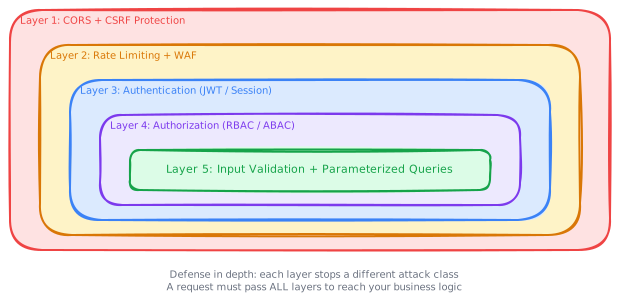
Cross-Origin Resource Sharing (CORS)
CORS controls which domains can call your API from a browser. Without CORS headers, browsers block cross-origin requests — this is a security feature, not a bug.
// CORS configuration — be specific, never use wildcard for credentialed requests
const corsOptions = {
  origin: ['https://app.company.com', 'https://admin.company.com'],
  methods: ['GET', 'POST', 'PUT', 'DELETE'],
  allowedHeaders: ['Content-Type', 'Authorization'],
  credentials: true, // Allow cookies
  maxAge: 86400, // Cache preflight for 24 hours
};
// NEVER: origin: '*' with credentials: true — browsers reject this
CSRF Protection
Cross-Site Request Forgery (CSRF) tricks a user's browser into making an authenticated request to your API from a malicious site. The browser automatically includes the user's cookies, so the request looks legitimate.
// CSRF protection: Synchronizer Token Pattern
// 1. Server generates a random CSRF token per session
// 2. Include it in the HTML form as a hidden field
// 3. Validate it on every state-changing request

async function csrfMiddleware(req: Request): Promise<void> {
  if (['POST', 'PUT', 'DELETE'].includes(req.method)) {
    const csrfToken = req.headers.get('X-CSRF-Token');
    const sessionToken = await redis.get(`csrf:${req.sessionId}`);
    if (!csrfToken || csrfToken !== sessionToken) {
      throw new ForbiddenError('Invalid CSRF token');
    }
  }
}
Interview tip: SameSite cookies eliminate most CSRF
Modern browsers support the SameSite cookie attribute. SameSite=Strict prevents the cookie from being sent on any cross-origin request — eliminating CSRF for most cases. SameSite=Lax (the default in modern browsers) blocks cookies on cross-origin POST/PUT/DELETE but allows them on GET navigations. If you mention SameSite=Strict in an interview, you can skip the CSRF token discussion — the browser handles it.
Input Validation & Injection Prevention
Every input from outside your trust boundary must be validated and sanitized. SQL injection, XSS, and command injection all exploit the same root cause: untrusted input treated as trusted code.
// BAD: SQL injection vulnerability
const query = `SELECT * FROM users WHERE email = '${email}'`; // NEVER DO THIS
// Attacker sends: email = "'; DROP TABLE users; --"

// GOOD: Parameterized queries — the database driver handles escaping
const user = await db.queryOne(
  'SELECT * FROM users WHERE email = $1', // $1 is a parameter placeholder
  [email] // Parameter value — always escaped by the driver
);

// GOOD: Schema validation at the API boundary
import { z } from 'zod';
const CreateUserSchema = z.object({
  email: z.string().email().max(255),
  name: z.string().min(1).max(100),
  role: z.enum(['viewer', 'editor', 'admin']),
});
const validatedInput = CreateUserSchema.parse(req.body);
// Invalid input throws before reaching your business logic
The bottom line: validate at the boundary, parameterize your queries, and never concatenate user input into SQL, HTML, or shell commands.
Zero Trust Architecture
Traditional network security is perimeter-based: everything inside the corporate network is trusted, everything outside is not. Zero Trust flips this completely: nothing is trusted, regardless of network location. Every request is authenticated and authorized, even between internal services on the same network.
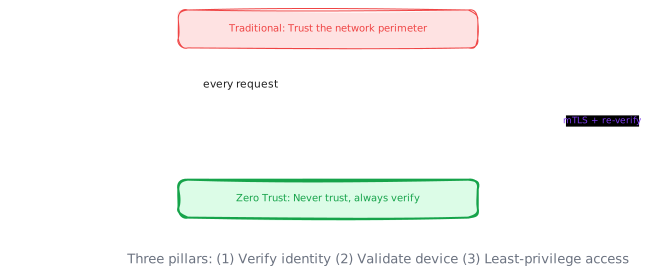
The three pillars of Zero Trust:
- Verify explicitly — Every request must present a verifiable identity (token, certificate). No implicit trust from being "inside the network."
- Least-privilege access — Grant the minimum permissions needed, using fine-grained authorization (RBAC/ABAC), scoped tokens, and just-in-time access.
- Assume breach — Design as if the attacker is already inside. Segment the network. Encrypt all internal traffic (mTLS). Monitor and log everything.
For your interview: Zero Trust comes up when designing microservices security, multi-region architectures, or any system where internal network compromise is a realistic threat. The one-liner: "We'd implement Zero Trust — every service-to-service call uses mTLS, and every request is authorized regardless of network origin."
Secrets Management
Secrets — API keys, database credentials, encryption keys, certificates — are the keys to your kingdom. How you store, distribute, rotate, and audit access to secrets is a core security concern.
// BAD: Secrets in code or environment variables
const DB_PASSWORD = 'super_secret_123'; // Committed to git, visible in env dumps
const dbUrl = `postgres://admin:${process.env.DB_PASSWORD}@db.example.com:5432/mydb`; // Env vars visible in process listing

// GOOD: Fetch secrets from a secrets manager at runtime
import { SecretsManager } from '@aws-sdk/client-secrets-manager';

const client = new SecretsManager({ region: 'us-east-1' });

async function getDbCredentials(): Promise<{ username: string; password: string }> {
  const response = await client.getSecretValue({ SecretId: 'prod/database/credentials' });
  return JSON.parse(response.SecretString!);
  // Secret is fetched at runtime, never stored in code or env vars
  // IAM policy controls which services can access which secrets
  // Automatic rotation every 30 days with zero downtime
}
Never store secrets in code, config files, or environment variables. Use a dedicated secrets manager. Rotate credentials automatically. Audit access. These aren't optional — they're the baseline.
Trade-offs
| Advantage | Disadvantage |
|---|---|
| Sessions — Server controls revocation instantly | Requires centralized session store (Redis), adds latency per request |
| JWTs — Stateless verification, scales horizontally | Cannot revoke until expiry. Larger payload. Claims visible to anyone. |
| RBAC — Simple, auditable, universally supported | Role explosion with fine-grained requirements. Can't express "only your department's data." |
| ABAC/PBAC — Eliminates role explosion, arbitrarily complex rules | Hard to audit, complex to test, performance overhead per evaluation |
| SSO — Single login for all apps, better UX, centralized control | IdP becomes a single point of failure. Compromised IdP = everything compromised. |
| mTLS — Strongest service identity, no secrets to manage in code | Certificate management complexity (solved by service mesh). CPU overhead for TLS handshakes. |
| API Keys — Simple for external integrations | Static, no expiry, no scoping, every validation hits a database |
| Zero Trust — Resilient to network compromise | Significant infrastructure investment. Every service must authenticate and authorize. |
| MFA — Blocks 99.9% of credential-stuffing attacks | User friction. Recovery complexity when users lose their second factor. |
The fundamental tension is security vs. usability and complexity. Every security measure adds friction for users (MFA), complexity for developers (ABAC), or infrastructure cost (mTLS, secrets management). The art is applying the right level of security for the sensitivity of the data — not maximum security everywhere.
When to Use It / When to Avoid It
Always include in your design:
- Authentication at the API gateway (JWT or session validation)
- Authorization at the service level (minimum: RBAC)
- HTTPS everywhere (terminate TLS at the load balancer)
- Secrets in a secrets manager, never in code
Include for senior/staff-level designs:
- mTLS for service-to-service communication
- Zero Trust architecture principles
- Token rotation and refresh token patterns
- ABAC/PBAC for compliance-driven systems
- Centralized audit logging for all auth events
Skip unless specifically asked:
- Implementation details of hashing algorithms (bcrypt cost factors, argon2 parameters)
- Detailed SAML assertion XML structure
- OAuth 2.0 device flow
- Biometric authentication implementation
- Hardware security module (HSM) internals
The honest interview advice: add a single callout — "Authentication at the gateway, authorization at the service, mTLS between services" — early in your design. That's 5 seconds that buys you massive credibility. Then dive deeper only if the interviewer probes.
Real-World Examples
Cloudflare — Zero Trust at Scale
Cloudflare migrated from a traditional VPN to a Zero Trust model (Cloudflare Access) serving 100,000+ enterprise customers. Their identity-aware proxy handles 55 million login events per day and supports 15+ identity providers via OIDC and SAML federation. The key lesson: they eliminated VPN split-tunneling latency by 73%, proving Zero Trust isn't just more secure — it's faster. Users connect directly to the nearest Cloudflare PoP (300+ data centers) instead of backhauling through a VPN concentrator.
Stripe — API Key Security Done Right
Stripe processes $1 trillion+ in annual transaction volume and built one of the most respected API key systems in the industry. Every API key is scoped (publishable vs. secret), environment-separated (test vs. live), and logged with complete request attribution. Their key innovation: restricted keys with granular permissions ("this key can only create charges, not read customer data") — applying the principle of least privilege to API credentials. After a leaked API key incident at a customer, Stripe built automatic key leak detection — scanning GitHub, npm, and other public repositories for exposed Stripe keys and proactively revoking them.
Google — BeyondCorp and Zanzibar
Google runs two of the most ambitious security systems ever built. BeyondCorp (Zero Trust) eliminated VPN for 100,000+ employees — every internal service is accessible from any network with per-request authentication, device trust scoring, and contextual access policies. Zanzibar (ReBAC authorization) processes 10 million authorization checks per second at P99 < 10ms latency, powering access control for Google Docs, Drive, YouTube, and Maps. The non-obvious lesson: Google's biggest security win wasn't a technology — it was the organizational decision to treat the corporate network as hostile. That mindset shift drove the architecture.
How This Shows Up in Interviews
Security comes up in two ways: as an explicit topic ("how would you secure this system?") and as an implicit expectation (the interviewer notes whether you mention auth at all). Both are equally important.
When to bring it up proactively:
- Immediately after drawing your high-level architecture, add the auth layer: "The API gateway handles JWT validation. Internal services use mTLS."
- When discussing data access: "Users can only access their own org's data — we enforce this at the query level with
WHERE org_id = ?." - When a multi-tenant question comes up: "Tenant isolation starts at auth. The JWT carries the
org_idclaim, and every database query filters on it."
Depth expected at senior/staff level:
- Name specific protocols (OIDC, not just "SSO")
- Explain the token lifecycle (access + refresh, rotation, revocation)
- Discuss the authorization model by name (RBAC vs ABAC) with justification
- Mention mTLS for service-to-service and why it's better than shared secrets
- Know the difference between 401 and 403
- Discuss Zero Trust as a network architecture principle
Interview tip: the 10-second security stamp
Early in your design, say: "Auth at the gateway — JWT validation, rate limiting. AuthZ at the service — RBAC with org-level isolation. mTLS between services. Secrets in Vault." That's 10 seconds. It covers authentication, authorization, transport security, and secrets management in a single breath. You've now shown security awareness and can move on to the interesting parts of the design.
| Interviewer asks | Strong answer |
|---|---|
| "How do you handle authentication?" | "OIDC with our identity provider. Short-lived JWTs (15 min) validated at the API gateway. Refresh tokens stored server-side with rotation on every use. MFA enforced for admin accounts." |
| "How do services talk to each other?" | "mTLS via the service mesh — each service gets a SPIFFE identity with auto-rotated certificates. No shared secrets, no API keys for internal communication." |
| "What authorization model?" | "RBAC for our use case — we have 5 roles. If we hit role explosion, we'd migrate to ABAC with OPA policies. For a collaborative feature, we'd consider ReBAC (Zanzibar-style)." |
| "What if a token is stolen?" | "Access tokens expire in 15 minutes — limited blast radius. Refresh tokens are rotated on every use with reuse detection. If we detect reuse, we revoke the entire token family and force re-auth." |
| "How do you store secrets?" | "AWS Secrets Manager with automatic rotation every 30 days. Services fetch credentials at startup and cache for 1 hour. No secrets in code, env vars, or config files." |
Test Your Understanding
Quick Recap
- Authentication (AuthN) verifies identity; Authorization (AuthZ) enforces permissions. They're separate systems — authenticate once at the gateway, authorize on every request at the service.
- JWTs enable stateless auth at scale (no session store lookup), but can't be revoked until expiry. Pair short-lived access tokens (15 min) with rotatable refresh tokens for the best of both worlds.
- RBAC is the right default for most applications (group permissions into roles). Migrate to ABAC/PBAC only when role explosion becomes a real problem, not a theoretical one.
- OAuth 2.0 is authorization (what can this app do?). OIDC adds authentication (who is this user?). Never use raw OAuth 2.0 for login — use OIDC's
id_tokenwith audience validation. - M2M auth uses API keys (simple, external), client credentials (scoped, short-lived), or mTLS (strongest, automated via service mesh). Never use user credentials for service-to-service communication.
- MFA blocks 99.9% of credential-stuffing attacks. Prefer TOTP/hardware keys over SMS. It's table stakes for admin accounts and production access.
- Zero Trust assumes the network is hostile and verifies every request cryptographically. It's the architecture that lets Google's 100,000 employees work without a VPN — and it's the direction every modern system is heading.
Related Concepts
- API Gateway — The enforcement point for authentication, rate limiting, and request routing. Your auth middleware lives here so individual services don't duplicate JWT validation logic.
- Microservices — Service-to-service authentication (mTLS, client credentials) becomes critical when you decompose a monolith. Each service boundary is a trust boundary.
- Rate Limiting — The first defense against brute-force credential attacks and API abuse. Rate limiting at the auth endpoint prevents password spraying; at the API level, prevents token abuse.
- Networking — TLS, mTLS, and certificate management are networking fundamentals that security builds on. Understanding the transport layer is essential for securing service communication.
- Service Mesh — Automates mTLS, certificate rotation, and service identity (SPIFFE) across your microservices fleet. The infrastructure layer that makes Zero Trust practical at scale.
Related Articles
Learn what an API Gateway is, how it works, its trade-offs, and exactly how to talk about it in a system design interview.
Learn how microservices decompose monolithic applications into independently deployable services, when the operational overhead is worth it, and how to avoid the distributed traps that swallow engineering teams.
Learn how rate limiting caps request throughput per client, which algorithm to choose for your traffic pattern, and how to enforce limits correctly in a distributed system.
Master the networking protocols, load balancing strategies, and failure-handling patterns that underpin every system design interview — from TCP vs UDP to L4 vs L7 load balancers.