Rate limiting
Learn how rate limiting caps request throughput per client, which algorithm to choose for your traffic pattern, and how to enforce limits correctly in a distributed system.
TL;DR
- A rate limiter caps how many requests a client can make in a given time window. It sits in front of your application and rejects excess traffic before it reaches your servers or database.
- Without rate limiting, any single client can saturate your infrastructure — a misbehaving scraper, an infinite-retry loop, or a coordinated DDoS can bring down a service that's fine under normal load.
- The five core algorithms — Token Bucket, Leaky Bucket, Fixed Window Counter, Sliding Window Log, and Sliding Window Counter — each make a different trade-off between burst tolerance, implementation simplicity, and precision at window boundaries.
- In a distributed system, per-server counters give each server a separate limit — 10 servers × 100 req/min = 1,000 req/min actual limit. Correct distributed rate limiting requires a centralised counter in Redis.
- The hardest operational problem isn't the algorithm — it's deciding what to limit on (IP, user ID, API key, endpoint) and what to do when Redis goes down (fail open vs. fail closed).
The Problem It Solves
It's 2 a.m. on a Tuesday. Your API is humming along at 800 requests/second from legitimate users. Then a scraper starts — not a clever one, just a naive Python loop with while True: requests.get(...).
Within 90 seconds, you have one client generating 25,000 requests/second. Your app servers CPU-pin at 100%, your database connection pool exhausts, and legitimate user requests start queuing.
P99 latency climbs from 80ms to 4 seconds. At 2:03 a.m., your on-call phone rings.
The scraper isn't doing anything your API doesn't support. It's just doing it way too fast. And because your API has no concept of "per-client limits", it treats that 25,000 req/s scraper the same as all your legitimate users — it processes every request until it can't.
Vertical and horizontal scaling don't help here
Adding more app servers or a bigger database doesn't fix the fundamental problem: you're spending real compute on requests you shouldn't be serving at all. Rate limiting is the one strategy that reduces load before work is done — everything else (caching, read replicas, CDNs) still processes the request. A rate limiter is the first line of defence because it costs almost nothing to reject a request at the edge.
The fix isn't more hardware. The fix is answering the question: does this client have the right to make this request right now? A rate limiter answers that question in under a millisecond, at the edge, before any business logic runs.
What Is It?
A rate limiter is a policy enforcement layer that tracks how many requests a client (identified by IP, user ID, API key, or endpoint) has made in a recent time window, and rejects new requests when the client exceeds the allowed threshold.
Analogy: Think of a toll road during rush hour. The toll booths don't care how important your trip is — they only care how many cars have passed in the last hour. If a toll operator sees the same car trying to pass every 30 seconds, they raise a barrier. The operator doesn't evaluate whether the trip is legitimate — they enforce the throughput rule regardless. A rate limiter is the same operator: a policy enforcement point that counts, compares against a threshold, and either waves you through or raises the barrier.
With rate limiting at the edge, the app tier sees only traffic that has passed the policy check. The scraper still gets responses — they just get 429 Too Many Requests instead of consuming your database connections.
How It Works
Here's what happens on every request when a fixed-window counter rate limiter is in front of your API (the simplest correct implementation — the sliding window variant is covered in the Algorithms section):
- Request arrives —
GET /api/productsfromuser_id=abc123. The rate limiter middleware intercepts this before any handler runs. - Identify the subject — The limiter extracts the rate limit key. Most commonly:
ratelimit:{user_id}:{window}orratelimit:{ip}:{endpoint}:{window}. The key choice determines the scope of the limit. - Atomic counter check in Redis — A single Lua script runs atomically: increment the counter and set a TTL on first increment. The atomic operation ensures no race condition between check and increment.
- Compare against threshold — If the current count is within the limit, the request passes. If over, the limiter returns
HTTP 429 Too Many Requestsimmediately — no app code runs. - Add response headers —
X-RateLimit-Limit,X-RateLimit-Remaining,X-RateLimit-Reset, andRetry-After. These tell clients how to back off correctly.
// Rate limiter middleware — fixed window counter implementation
async function rateLimitMiddleware(
  req: Request,
  res: Response,
  next: NextFunction
): Promise<void> {
  const userId = req.user?.id ?? req.ip ?? 'anonymous'; // guard: req.ip can be undefined behind a proxy
  const windowSeconds = 60;
  const maxRequests = 100;
  const key = `ratelimit:${userId}:${Math.floor(Date.now() / 1000 / windowSeconds)}`;

  // Atomic Lua script: INCR + EXPIRE in one round trip — no race condition
  const luaScript = `
    local count = redis.call('INCR', KEYS[1])
    if count == 1 then
      redis.call('EXPIRE', KEYS[1], ARGV[1])
    end
    return count
  `;

  const count = await redis.eval(luaScript, 1, key, windowSeconds) as number;

  const resetTimestamp = Math.floor(Date.now() / 1000 / windowSeconds + 1) * windowSeconds;

  // Set informational headers regardless of outcome
  res.setHeader('X-RateLimit-Limit', maxRequests);
  res.setHeader('X-RateLimit-Remaining', Math.max(0, maxRequests - count));
  res.setHeader('X-RateLimit-Reset', resetTimestamp);

  if (count > maxRequests) {
    const retryAfter = Math.max(1, resetTimestamp - Math.floor(Date.now() / 1000));
    res.setHeader('Retry-After', retryAfter);
    res.status(429).json({
      error: 'Too Many Requests',
      message: `Rate limit exceeded. Try again in ${retryAfter} seconds.`,
    });
    return; // Do NOT call next() — request is rejected here
  }

  next(); // Under the limit — proceed to business logic
}
Interview tip: atomic increment is the correctness key
When explaining rate limiting implementation, the examiner will probe your INCR + check approach. The critical point: you must use a single atomic operation (Redis Lua script or INCR with conditional) — never GET-then-SET. The GET-then-SET pattern has a race condition: two concurrent requests can both read 99, both decide they're under limit 100, both increment to 100, and both pass — effectively allowing 101 requests. Say this explicitly and show the Lua script.
Every rejected request costs you < 1ms on Redis. The app server never sees it. At scale this matters enormously — a 429 at the edge is orders of magnitude cheaper than a 503 at the database.
Key Components
| Component | Role |
|---|---|
| Rate limit key | The string identifier for a client's counter. Namespace: ratelimit:{subject}:{window}. The subject can be a user ID, IP address, API key, or combination. Poorly designed keys either grant too much (IP shared across a corporate NAT) or too little (per-endpoint rate limits that are too restrictive). |
| Counter store | Redis in production — atomic INCR, sub-millisecond reads, built-in TTL for automatic key expiry. In-memory counters (per-server) are simpler but wrong in a distributed system — each server maintains its own count. |
| Window | The time bucket over which requests are counted. Fixed window (hard reset every minute) vs. sliding window (count in the last N seconds from now). Window type determines whether boundary exploits are possible. |
| Limit threshold | The maximum allowed requests per window per subject. Must be set per-endpoint and per-client tier — a search endpoint and a delete endpoint should never share one limit. |
| Limit identifier | What you use to tell clients apart. API key for authenticated clients (most precise). User ID for logged-in sessions. IP address for unauthenticated endpoints (imprecise — many users share one IP). |
| Response headers | X-RateLimit-Limit, X-RateLimit-Remaining, X-RateLimit-Reset, Retry-After. Clients that receive these can implement smart backoff. Without headers, well-behaved clients can't adjust — and badly-behaved ones won't anyway. |
| Failure mode | What happens when Redis is unreachable. Fail open (allow all requests, no limiting) or fail closed (reject all requests). Both are wrong in absolute terms. Correct answer: circuit breaker with local in-memory fallback counter. |
| Burst allowance | A secondary limit allowing short spikes above steady-state. Token bucket naturally encodes this via bucket capacity. Fixed and sliding window algorithms require a separate burst configuration. |
Algorithms — Five Approaches
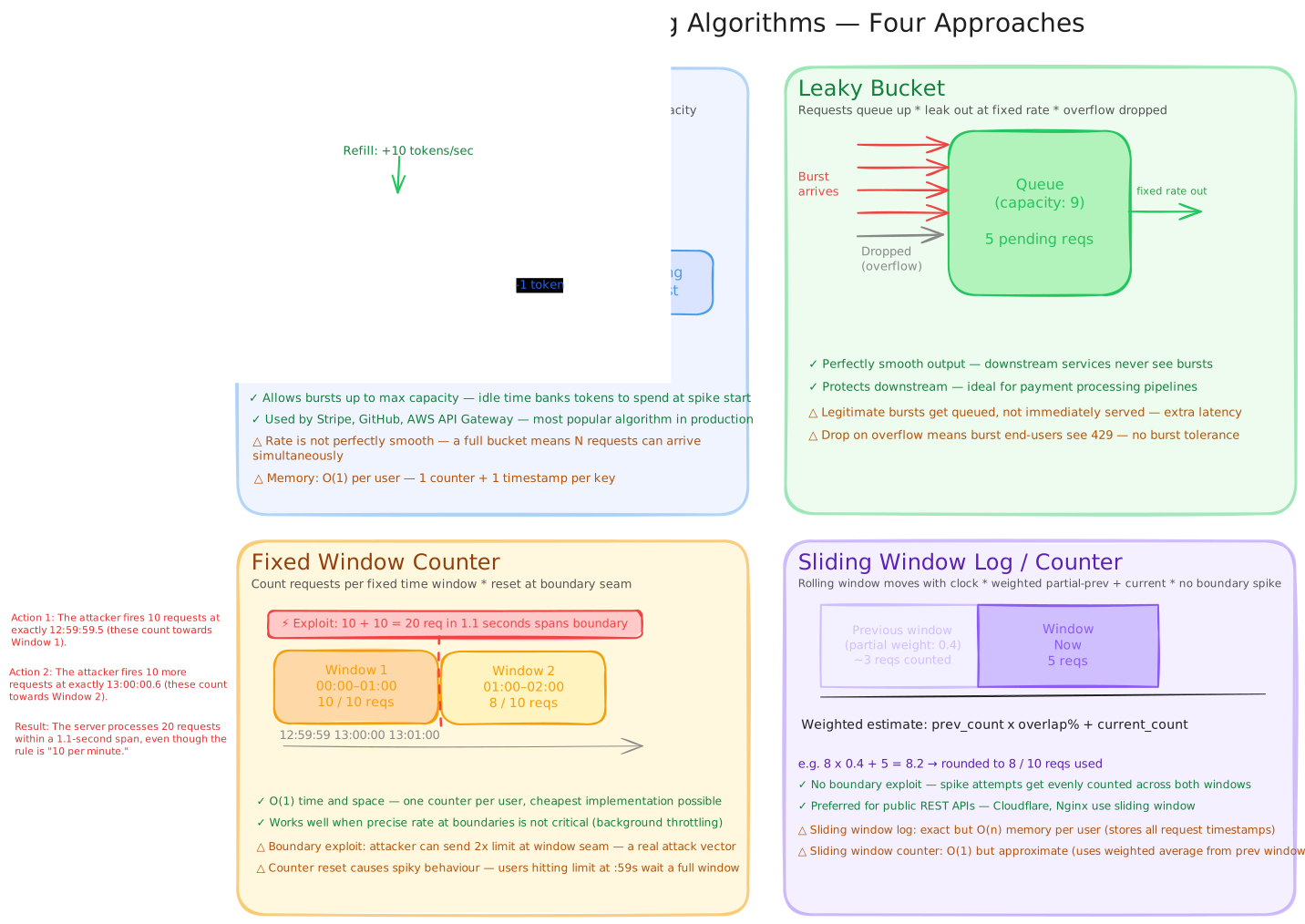
Token Bucket
A bucket starts with capacity tokens and is refilled at a constant refill_rate. Each request consumes one token. If the bucket is empty, the request is rejected.
The key insight: a full bucket means a client can burst capacity requests instantly. Idle time banks tokens — a user who hasn't made requests for 10 seconds has accumulated tokens and can spend them in a burst.
interface TokenBucket {
  tokens: number;       // Current token count
  lastRefill: number;   // Unix timestamp of last refill
  capacity: number;     // Max tokens (burst ceiling)
  refillRate: number;   // Tokens added per second
}

function allowRequest(bucket: TokenBucket): boolean {
  const now = Date.now() / 1000;
  const elapsed = now - bucket.lastRefill;

  // Refill based on elapsed time since last check
  bucket.tokens = Math.min(
    bucket.capacity,
    bucket.tokens + elapsed * bucket.refillRate
  );
  bucket.lastRefill = now;

  if (bucket.tokens >= 1) {
    bucket.tokens -= 1;
    return true; // Request allowed
  }

  return false; // Bucket empty — reject
}
This in-memory implementation explains the algorithm — in production, the same logic runs inside a Redis Lua script so the bucket state is shared across all app servers (see the Distributed Rate Limiting section for the full implementation).
Best for: Public REST APIs where users expect to burst on login, dashboard load, or search — then settle to steady-state. Used by Stripe (default algorithm), GitHub API, AWS API Gateway.
Leaky Bucket
Requests queue in a fixed-capacity bucket. A processor drains the queue at a constant leak_rate. New requests that arrive when the bucket is full are dropped immediately.
The key insight: output is always exactly leak_rate — no matter how bursty the input. Deterministic output rate protects downstream systems from ever seeing a sudden spike.
Best for: Payment processing gateways, order management systems — anything where you need to guarantee downstream services see a capped, smooth throughput ceiling regardless of what clients do.
Fixed Window Counter
Count requests in hard time buckets (e.g., "how many requests in minute 14:03?"). Reset the counter to zero at the window boundary.
The boundary exploit (real attack vector): If the limit is 100 req/min, an attacker can send 100 requests at 14:02:59 and 100 requests at 14:03:01 — that's 200 requests in a 2-second window with no violation detected. This isn't theoretical; rate limit bypass tools specifically target fixed-window APIs.
I've seen this exploit used against a production API — the attacker timed their requests to the second using the X-RateLimit-Reset header we were returning. The boundary is not a niche theoretical concern; it's in the OWASP API Security guidelines for a reason.
Best for: Internal tooling, background job rate limiting, situations where the boundary edge-case is acceptable. Never use for security-sensitive endpoints.
My recommendation here is simple: if you're protecting a public API, use sliding window. The implementation complexity delta is minimal, and the boundary exploit is a well-known real-world attack.
Sliding Window Log
Store a timestamp for every request in the last window. Count the log entries to determine current usage.
Precise but expensive: O(n) memory per user where n = max requests per window. At 1,000 req/min limit × 10M users, the memory requirement is genuinely non-trivial.
Sliding Window Counter (Approximate)
Keep just two counters: the previous window count and the current window count. Estimate the count in the logical "last N seconds" using a weighted formula:
estimated_count = prev_count × (1 - elapsed_fraction) + curr_count
Where elapsed_fraction = how far into the current window we are. If you're 40% into the current minute, then 60% of the previous minute is still in your 1-minute lookback window.
Best for: High-scale production APIs where O(1) memory is essential but fixed-window boundary exploits are unacceptable. Cloudflare uses this approach.
Trade-offs
| Pros | Cons |
|---|---|
| Protects infrastructure — single misbehaving client cannot saturate compute or database connections | False positives — spiky but legitimate traffic (mobile retries after connectivity loss) looks identical to abuse |
| Cheap rejections — 429 at the edge costs < 1ms Redis round-trip; never touches business logic or database | Rate limit key precision — IP-based limiting punishes shared IPs (corporate NAT, university networks, mobile carriers) |
| Forces good API citizenship — clients that handle 429 correctly (Retry-After, exponential backoff) are better API consumers | Distributed state — per-server counters are wrong; Redis is the correct answer but adds a network hop and operational complexity |
| Tiered limits possible — free users, pro users, partners can each get different thresholds with the same implementation | Redis as SPOF — if rate limit state is in one Redis cluster, that cluster's failure must have an explicit, well-defined fallback |
| Elastic load shaping — smooth spiky upstream traffic into a capped rate that downstream can absorb reliably | Parameter tuning — every endpoint needs its own limit. One global limit is wrong; 200 individual limits require operational discipline |
| Compliance — some API contracts require demonstrable per-client throttling as a billing or SLA guarantee | Approximate algorithms have margin of error — Sliding window counter uses a weighted estimate; the effective limit can be ~0.1% above configured threshold at the window boundary. Token bucket and fixed-window counter with Redis INCR are exact. |
The fundamental tension here is precision vs. complexity. The most precise rate limiting (sliding window log, perfectly centralised) has the highest operational cost (Redis memory, network hops, synchronisation overhead). The cheapest implementation (per-server fixed window) is imprecise and exploitable. Real systems pick the middle: sliding window counter in centralised Redis — O(1) memory, no boundary exploit, one network hop per request.
Distributed Rate Limiting
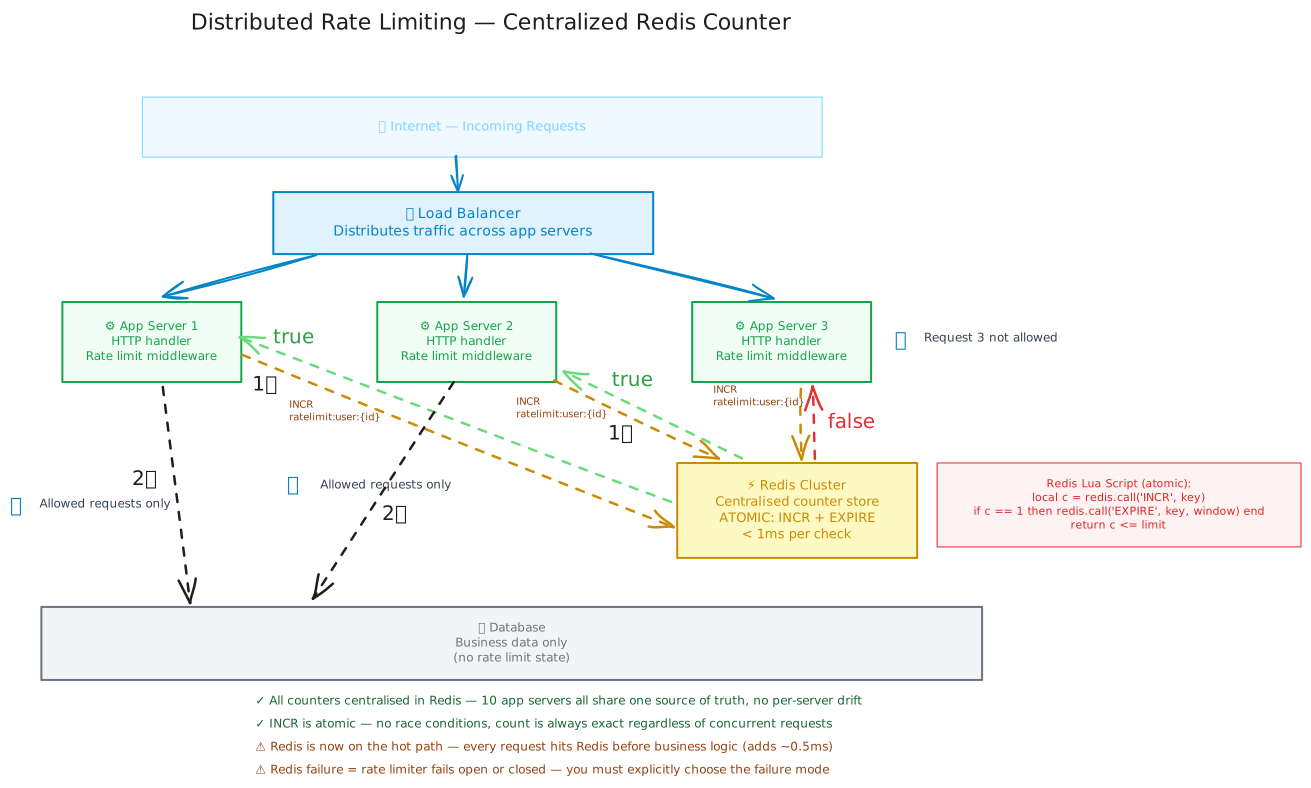
A naive implementation puts the counter in the app server's memory. This is correct for a single-server deployment and completely wrong the moment you scale horizontally.
If you have 10 app servers each with a 100 req/min limit, your effective limit is 1,000 req/min per user — because a user can spread their requests across all 10 servers and none of them individually sees a violation.
The solution is a centralised counter in Redis. Every app server, regardless of which requests it handles, atomically increments the same key in Redis.
// Distributed token bucket in Redis — works across any number of app servers
const REFILL_RATE = 10; // tokens per second
const CAPACITY = 100;   // max burst size

const tokenBucketScript = `
  local key = KEYS[1]
  local capacity = tonumber(ARGV[1])
  local refill_rate = tonumber(ARGV[2])
  local now = tonumber(ARGV[3])

  local bucket = redis.call('HMGET', key, 'tokens', 'last_refill')
  local tokens = tonumber(bucket[1]) or capacity
  local last_refill = tonumber(bucket[2]) or now

  -- Refill based on elapsed time
  local elapsed = now - last_refill
  tokens = math.min(capacity, tokens + elapsed * refill_rate)

  -- Check and consume
  if tokens < 1 then
    redis.call('HSET', key, 'tokens', tokens, 'last_refill', now)
    return 0 -- Rejected
  end

  tokens = tokens - 1
  redis.call('HSET', key, 'tokens', tokens, 'last_refill', now)
  redis.call('EXPIRE', key, math.ceil(capacity / refill_rate) * 2)
  return 1 -- Allowed
`;

async function checkRateLimit(userId: string): Promise<boolean> {
  const key = `ratelimit:tokenbucket:${userId}`;
  const now = Date.now() / 1000;
  const result = await redis.eval(tokenBucketScript, 1, key, CAPACITY, REFILL_RATE, now);
  return (result as number) === 1;
}
Per-server counters are the #1 distributed rate limiting mistake
I've seen this in production more than once: a rate limiter built and tested on a single server, deployed to a fleet, and then found to have an effective limit 10× higher than configured because each server counts independently. If you deploy rate limiting without a centralised counter, you haven't deployed rate limiting — you've deployed the appearance of rate limiting.
When to Use It / When to Avoid It
Here's the honest operational answer: almost every externally-facing system needs rate limiting eventually — the real question is where to put it and how aggressive to be. Here's the practical breakdown.
Use rate limiting when:
- You have a public or partner-facing API that can be called programmatically. Without it, a loop is the only thing standing between you and 100% CPU.
- Your endpoints trigger significant downstream work — a search query, an email send, an ML inference — where volume control is essential.
- You're monetising API access in tiers (free/pro/enterprise). Rate limits are the enforcement mechanism.
- You need protection from retry storms — when clients retry aggressively after a brief outage, rate limiting prevents them from making the outage worse.
- Compliance or contract requires per-client throughput guarantees or capping.
Avoid or be very careful when:
- You're rate limiting authenticated internal services talking to each other (prefer circuit breakers or bulkheads — rate limits add latency to internal traffic where trust is already established).
- Your traffic is genuinely bursty-but-legitimate by design — for example, a bulk import tool that sends 500 requests in a second on data load. Set a separate burst limit rather than blocking the workload.
- You use IP as the rate limit key on an endpoint used behind mobile carriers or corporate NAT — all employees at a company could share one external IP, so one power user triggers a 429 for the whole office.
So when does rate limiting actually matter in an interview? Bring it up as soon as you sketch an API endpoint that accepts user input or triggers meaningful compute. Don't wait for the interviewer to ask — mention it proactively with a specific threshold and the Redis implementation in the same sentence.
Rate Limit Headers — The Client Contract
A rate limiter that doesn't tell clients when to retry is just an opaque wall. The response headers are the contract that allows well-behaved clients to self-throttle.
| Header | Example | Meaning |
|---|---|---|
X-RateLimit-Limit | 100 | The maximum requests allowed per window |
X-RateLimit-Remaining | 57 | Requests left in the current window |
X-RateLimit-Reset | 1711320060 | Unix timestamp when the window resets |
Retry-After | 60 | Seconds before the client should retry (on 429 only) |
// Client-side: respecting rate limit headers (good API citizenship)
async function apiCallWithBackoff(url: string, retries = 3): Promise<Response> {
  const res = await fetch(url);

  if (res.status === 429) {
    const retryAfter = Number(res.headers.get('Retry-After') ?? 60);
    if (retries > 0) {
      await new Promise(r => setTimeout(r, retryAfter * 1000));
      return apiCallWithBackoff(url, retries - 1);
    }
    throw new Error('Rate limit exceeded — all retries exhausted');
  }

  return res;
}
Good clients read Retry-After and wait exactly that long. Great clients track X-RateLimit-Remaining and pre-emptively slow down before hitting zero. Bad clients (and most scrapers) ignore all of these — which is fine, because your limiter will stop them regardless.
Real-World Examples
Stripe — Token Bucket with tiered limits per API key
Stripe uses token bucket per API key with tiered limits: test mode keys have 25 req/s, live mode keys have 100 req/s, and enterprise keys have custom limits negotiated per contract. Stripe separates write limits (POST /charges) from read limits (GET /charges), because writes trigger downstream bank network calls and carry a higher cost per operation.
The lesson: one rate limit per API key is not enough. Different endpoints have radically different cost profiles — a read and a write should never share the same quota.
Cloudflare — Sliding Window Counter at 1 trillion requests/day
Cloudflare processes roughly 1 trillion HTTP requests per day. Their rate limiting product uses the sliding window counter — the approximate weighted-average approach — because storing per-user request logs (exact sliding window log) would require petabytes of RAM at that scale. The weighted-average introduces at most ~0.1% error on the configured limit, which is an acceptable precision trade-off in exchange for O(1) memory per user on commodity hardware.
The lesson: algorithm choice at 1T req/day is a memory constraint problem first and a correctness problem second. Exact precision costs exponentially more than approximate precision.
Twitter (X) — Multi-dimensional limits with application + user tiers
Twitter's public API enforces limits across three dimensions simultaneously: per-user, per-app, and per-endpoint. An app might have 300 reads per 15 minutes total, but each authenticated user within that app is also capped at 75 reads — the limits compound. This three-axis model lets Twitter grant high aggregate throughput to large platforms while preventing any single user from monopolising the quota.
The lesson: serious production rate limiting needs at least two dimensions — per-user and per-app. Otherwise, clever clients distribute requests across many accounts and bypass single-axis limits trivially.
How This Shows Up in Interviews
When to bring it up proactively
Draw a rate limiter as soon as you sketch any public-facing API endpoint. In the first 5 minutes say: "I'd add a rate limiter here — token bucket, 100 requests per minute per user, backed by a centralised Redis counter. That protects the app tier from burst abuse and ensures one bad client can't take down the system." That one sentence — algorithm choice, threshold, implementation detail — signals you understand rate limiting operationally, not just definitionally.
Don't just name the algorithm — explain why you chose it
Saying "we'd use a token bucket" without explaining that it's because you want to allow bursts (e.g., a user loading a dashboard triggers 8 API calls in parallel) signals a memorised answer with no reasoning. Pair every algorithm choice with the traffic pattern it fits: token bucket for burst-and-settle; leaky bucket for smooth downstream protection; sliding window for boundary-exploit prevention.
Depth expected at senior/staff level:
- Name the algorithm and explain the traffic pattern it matches — not just the algorithm definition.
- Explain why per-server counters are wrong and why a centralised Redis counter solves it. Mention the Lua script atomicity requirement specifically.
- Address the distributed rate limit key design: demonstrate you know when IP is wrong (NAT) and when user ID is correct (authenticated APIs), and that the key needs a time dimension (window bucketing).
- Know the failure mode question: if Redis goes down, do you fail open (allow all traffic — risk abuse) or fail closed (reject all traffic — risk availability)? Correct answer: neither extreme — circuit breaker with local fallback counter for a short window.
- Know the boundary exploit in fixed-window and be able to describe it precisely: "100 req in last 5 seconds of window + 100 req in first 5 seconds of next window = 200 requests in 10 seconds, undetected."
Common follow-up questions and strong answers:
| Interviewer asks | Strong answer |
|---|---|
| "How would you handle rate limiting in a distributed system?" | "Centralised Redis counter. Every app server atomically INCRs the same key using a Lua script — GET-then-SET has a race condition where two servers can both read 99, both pass, and one increments to 101. The Lua script is atomic across Redis: INCR the key, on first increment set EXPIRE to the window. All servers share one consistent counter." |
| "What if Redis goes down — how does your rate limiter behave?" | "I'd use a circuit breaker on the Redis client. If Redis is unreachable, fall through to a local in-memory counter with a tighter limit — say 50% of normal — as a degraded-mode protection. Fail completely open (0 limiting) risks abuse; fail completely closed (reject everything) kills availability. The local fallback is a brief best-effort protection while Redis recovers." |
| "How do you rate limit unauthenticated API traffic?" | "IP address with careful consideration. The problem: corporate NAT and carrier-grade NAT mean thousands of legitimate users can share one external IP. For truly unauthenticated endpoints I'd use IP rate limiting but set the threshold high enough to accommodate a small company's traffic — e.g., 1,000 req/min rather than 100 — and combine it with per-session or fingerprint-based limiting if abuse is a realistic threat model." |
| "How would you implement different limits for free vs. pro users?" | "At key construction time: ratelimit:{tier}:{userId}:{window}. The Lua script takes limit as a parameter rather than a hardcoded constant. On each request, fetch the user's tier from a fast cache key (or JWT claim), choose the limit accordingly, and pass it to the rate limit script. This way free users get 100 req/min and pro users get 1,000 req/min from the same implementation." |
| "What number should you actually set the rate limit to?" | "Start with the 99th percentile of your current legitimate traffic per user per minute, multiply by 2 as a burst buffer, and set that as your limit. Monitor 429 rates — if legitimate users are hitting limits, you've set it too low. If abusers are getting through, your key granularity is too coarse. Rate limit thresholds almost always need one iteration after production observation." |
Test Your Understanding
Quick Recap
- A rate limiter caps per-client request throughput and rejects excess traffic at the edge before it reaches business logic — a 429 costs < 1ms at the rate limiter vs. 50ms+ at the application and orders of magnitude more if the request reaches the database.
- The five algorithms are Token Bucket (burst-tolerant, idle time banks tokens), Leaky Bucket (constant output rate, no burst tolerance), Fixed Window Counter (O(1), exploitable at boundaries), Sliding Window Log (exact, O(n) memory per user), and Sliding Window Counter (approximate weighted average, O(1) memory — preferred for high-scale public APIs).
- In a distributed system, per-server counters are wrong — a 100 req/min limit across 10 servers becomes a 1,000 req/min effective limit. Use a single Redis counter with atomic INCR via Lua script.
- The rate limit key design matters as much as the algorithm: IP is wrong for endpoints behind corporate NAT; user ID is correct for authenticated APIs; combine both dimensions plus a time window bucket for safety.
- When Redis fails, "fail open" risks abuse; "fail closed" kills availability. The correct answer is a local in-memory fallback counter with a more conservative limit that bridges the Redis recovery window.
- Always set
X-RateLimit-Limit,X-RateLimit-Remaining,X-RateLimit-Reset, andRetry-Afterheaders — they're the contract that allows well-behaved clients to self-throttle and tells genuinely over-quota clients when to retry. - The hardest rate limiting problem isn't choosing an algorithm — it's multi-account abuse, deciding which dimension to limit on, and tuning thresholds to distinguish spiky-but-legitimate traffic from actual abuse.
Related Concepts
- Caching — Rate limiting and caching are often co-located at the API gateway layer. A Redis cluster used for rate limit counters is typically the same cluster used for application caching — understanding how they share (and compete for) memory and ops/sec is essential for sizing.
- API Gateway — The natural deployment point for rate limiting in a microservices architecture. Rather than implementing rate limiting in every service individually, a centralised API gateway enforces limits before traffic reaches internal services, eliminating N implementations and giving you a single control plane.
- Load Balancing — Distributing traffic across app servers is what causes the distributed rate limiting problem in the first place. Understanding how a load balancer distributes requests explains why per-server counters are wrong and why Redis centralisation is the correct fix.
- Scalability — Rate limiting is one of the few horizontal scaling enablers that works by reducing load rather than adding capacity. Understanding it alongside CDN, caching, and sharding gives you the full picture of load management at scale.
- Message Queues — For endpoints with expensive downstream side-effects (payment charges, email sends, ML inference), the correct alternative to rejecting rate-limited requests is queuing them. A queue-based architecture decouples submission rate from processing rate, making "rate limiting" a throughput shaping problem rather than a rejection problem.
Related Articles
Learn how caching eliminates redundant database reads, which strategy to choose for your write pattern, and how to design a cache layer that survives invalidation at scale.
Learn what an API Gateway is, how it works, its trade-offs, and exactly how to talk about it in a system design interview.
Learn how load balancers distribute traffic across servers, which algorithms to choose, and how to design a highly-available app tier in any system design interview.
Learn why systems break under load, how horizontal and vertical scaling work, and how to design for 10x traffic without a 3 a.m. outage.