CDN (Content Delivery Network)
Learn how a CDN routes users to the nearest edge server, cuts global latency from 300ms to under 30ms, offloads 95%+ of traffic from your origin, and when you actually need one.
TL;DR
- A CDN (Content Delivery Network) is a globally distributed network of edge servers — called Points of Presence (PoPs) — that cache copies of your content as close to users as possible. A request from Sydney to a New York origin takes ~300ms round-trip. To a Sydney PoP, it takes ~5ms.
- Without a CDN, every request for a static file — your JavaScript bundle, your hero image, your video — travels all the way to your single origin server. Every byte traverses the public internet. At any kind of global scale, this is the first performance bottleneck that kills user experience.
- At a 95% edge cache hit rate, your origin receives 20× less traffic. The same compounding math as application-level caching, applied to the outermost layer of your stack.
- Static content (CSS, JS, images, fonts, video) should be CDN-served by default. Dynamic content (API responses, personalised pages) can still benefit from TCP acceleration and TLS termination at edge even when it can't be cached.
- The hardest CDN problem is cache invalidation: when you update your JS bundle, every PoP worldwide must serve the new version. The two solutions are time-based TTL (simple, eventually consistent) and content-addressable URLs (instant, requires build tooling).
The Problem It Solves
It's launch day. Your team spent three months building a news app. TechCrunch runs a front-page feature. Traffic spikes globally — engineers in Berlin, journalists in Tokyo, readers in São Paulo all hit the "read" button at once.
Your single origin server sits in US-East-1, Virginia. For a user in Sydney, a TCP connection alone takes ~160ms (speed of light across the Pacific). Add TLS handshake (~80ms), HTTP request (~40ms), response transfer (~80ms for a 500KB JS bundle): first contentful paint arrives in 360ms.
That's before the app even renders. I'll often see candidates gloss over this number in system design interviews — the latency budget is already spent before the framework renders a single pixel. Google's Core Web Vitals mark anything over 2.5 seconds LCP as "poor," and you're spending a third of that budget on pure network transit.
Meanwhile, your origin is receiving every image request, every font file, every versioned JavaScript bundle — from every user worldwide — simultaneously. Your bandwidth bill is calculated on egress bytes from your cloud provider at $0.09/GB. A 2MB average page weight × 50,000 concurrent users = 100GB egress in the first hour.
$9 for one hour of page loads, before your database or compute costs. And your single origin server becomes a single point of failure: one garbage collection pause or DB connection spike takes down users globally.
A single origin serving a global audience is a problem you cannot solve by adding more app servers.
The false assumption in 'just add more app servers'
Horizontal scaling adds compute capacity, but it doesn't reduce the network distance between your origin and your users. A user in Mumbai is still 200ms away from your Virginia load balancer whether you run 2 app servers or 20. Adding instances behind your load balancer does nothing for the latency that lives in the physical wire.
Without a CDN, every asset download — including your 800KB gzipped JavaScript bundle — makes the full intercontinental round trip. Static files that never change between requests are served fresh from origin, on every request, to every user.
What Is It?
A CDN is a globally distributed caching layer that sits between your users and your origin server. It is a network of Points of Presence (PoPs) — data centers on every continent — that intercept requests for your content.
When a user in Sydney requests your JavaScript bundle, the CDN routes them to the nearest Sydney PoP. The PoP serves the file from its local cache in under 10ms. Your origin in Virginia never sees the request.
My recommendation: treat the CDN as mandatory infrastructure for any app with global users, not an optional performance enhancement.
Analogy: Think of how Amazon distributes inventory. Before Amazon Fulfillment Centers existed, every order shipped from one central warehouse. A customer in Los Angeles waited 5 days for a book warehoused in Hoboken, New Jersey.
Amazon's insight was to stock products in fulfillment centers close to customers — so an LA order ships from a downtown LA warehouse and arrives tomorrow. A CDN does exactly this for your digital content. Your origin is the central warehouse, PoPs are the fulfillment centers, and a cache hit is same-day delivery.
Cache misses — the rare case where the local fulfillment center is out of stock — still require a trip to the central warehouse, but at 5% frequency they don't define the user experience.
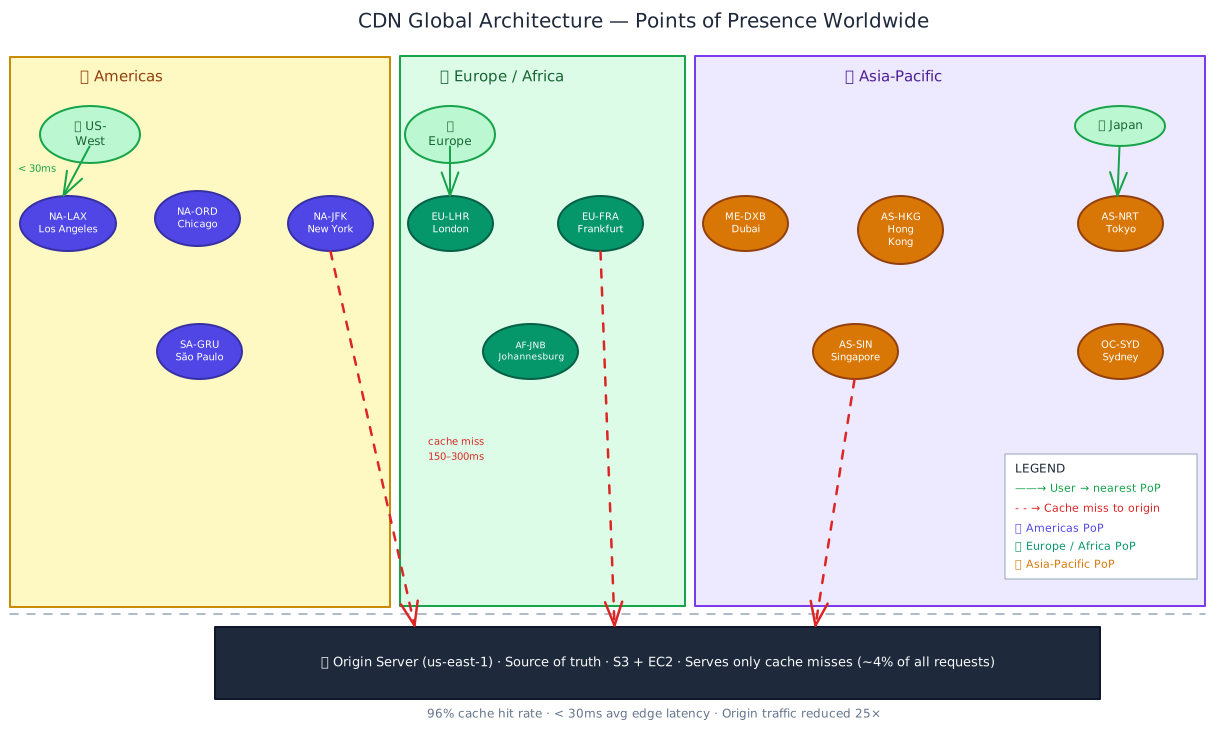
The CDN edge layer absorbs 95%+ of global traffic. Your origin infrastructure — previously the bottleneck for every user worldwide — now only handles cache misses, writes, and dynamic requests. The same origin that struggled under global load now runs comfortably.
How It Works
Here is what happens, step by step, when a user in Tokyo requests your application's JavaScript bundle for the first time — and every time after:
Step 1: DNS routes the user to the nearest PoP
The CDN replaced your origin's DNS record with a CDN-managed record. When the user's browser resolves assets.yourapp.com, the CDN's authoritative DNS returns the IP address of the geographically nearest PoP.
For a user in Tokyo, that's the AS-NRT edge node. I find most engineers understand CDN caching intuitively but underestimate this DNS routing layer — it's what makes "nearest PoP" actually mean something. This routing uses one of two mechanisms:
- GeoDNS — The DNS server inspects the client's IP address and returns the PoP IP in the closest geographic region.
- Anycast — Multiple PoPs share the same IP address. BGP routing automatically delivers packets to the topologically nearest node. This is how Cloudflare operates and provides automatic failover if a PoP goes down.
Step 2: PoP checks its local cache
The PoP looks up the request path (/static/app.7f3c2a1b.js) in its local cache. It checks whether a cached copy exists and whether it's still within its TTL.
Cache HIT (95% of requests): The PoP serves the cached file directly. Latency: 5–30ms depending on distance to PoP. The origin server is never contacted. This is the steady-state operating mode.
Cache MISS (first request or TTL expired): The PoP doesn't have a fresh copy. It must fetch from origin.
Step 3: Cache miss → PoP fetches from origin
The PoP opens a TCP connection to your origin and fetches the file. This incurs full origin latency (150–300ms from Tokyo to Virginia). Once fetched, the PoP caches the response per the Cache-Control header your origin sends, then serves the response to the waiting user.
Step 4: All subsequent requests → cache HIT
Every user in the Tokyo region who requests the same file now gets the cached version from AS-NRT. The origin never sees them. This holds until the TTL expires or you explicitly purge the PoP's cached copy.
At steady state, the CDN is invisible to your origin — and that's exactly the point.
import type { Response, Request, NextFunction } from 'express';

// Production Cache-Control strategy — set on your origin server
// These headers tell the CDN how long to cache each type of content

export function cacheControlMiddleware(req: Request, res: Response, next: NextFunction) {
  const path = req.path;

  // Hashed static assets: filename contains content hash (webpack, Vite)
  // e.g., /static/app.7f3c2a1b.js — content hash changes on every build
  if (/\/static\/.*\.[0-9a-f]{6,}\.(js|css|woff2?|png|webp|svg)$/.test(path)) {
    // max-age=31536000: browsers cache for 1 year
    // immutable: browser won't send conditional request (If-None-Match) — no round-trip
    res.setHeader('Cache-Control', 'public, max-age=31536000, immutable');
    return next();
  }

  // Non-hashed static files (robots.txt, favicon.ico, sitemap.xml)
  if (/\.(ico|txt|xml)$/.test(path)) {
    // s-maxage=86400: CDN caches for 24h (overrides max-age for CDN only)
    // stale-while-revalidate=3600: CDN serves stale for 1h while fetching fresh
    res.setHeader('Cache-Control', 'public, max-age=3600, s-maxage=86400, stale-while-revalidate=3600');
    return next();
  }

  // Cacheable API responses: CDN caches, browsers don't
  // e.g., trending feed, public product catalog, config endpoint
  if (path.startsWith('/api/public/')) {
    res.setHeader(
      'Cache-Control',
      'public, max-age=0, s-maxage=60, stale-while-revalidate=300'
      // max-age=0: browsers always re-request (they see stale data immediately otherwise)
      // s-maxage=60: CDN serves this for 60s without re-fetching origin
      // stale-while-revalidate=300: CDN serves stale for up to 5 min while refreshing in background
    );
    return next();
  }

  // Private/authenticated content — must never be cached at CDN layer
  res.setHeader('Cache-Control', 'private, no-store');
  next();
}
Interview tip: cite the s-maxage vs max-age distinction
The difference between max-age and s-maxage is a signal most engineers miss. max-age controls browser caching. s-maxage controls shared caches — specifically your CDN. Setting s-maxage=60, max-age=0 lets the CDN serve a cached response for 60 seconds while forcing browsers to always check. This is the correct pattern for public API endpoints where you want CDN acceleration but not browser caching.
Cache-Control header reference
| Directive | Scope | What it does |
|---|---|---|
public | CDN + browser | Content is safe to cache by any intermediate cache |
private | Browser only | Only the end user's browser may cache; CDN must not |
max-age=N | Browser | Browser uses cached copy for N seconds without re-requesting |
s-maxage=N | CDN only | CDN uses cached copy for N seconds (overrides max-age for CDNs) |
no-cache | Both | Must revalidate with origin before serving (conditional GET with ETag) |
no-store | Both | Never cache — don't write to disk or memory at all |
immutable | Browser | Never send a conditional request; content identified by URL is permanent |
stale-while-revalidate=N | CDN (RFC 5861) | Serve stale for N seconds while refreshing in background (no user waits) |
s-maxage is the single header value you control that determines whether your CDN is actually doing its job.
Key Components
| Component | Role |
|---|---|
| PoP (Point of Presence) | A CDN data center in a specific city. Stores cached copies of your content. Routes traffic from users in the surrounding region. Major CDNs have 200–300+ PoPs. |
| Origin server | Your actual application server. The authoritative source. The CDN fetches from here on cache misses and for all non-cacheable content. |
| Cache-Control header | The HTTP response header from your origin that tells PoPs how long to cache, who can cache, and what to do with stale entries. The primary lever you have over CDN behaviour. |
| TTL (Time-To-Live) | The duration a PoP holds a cached response before considering it stale and re-fetching. Determined by s-maxage or max-age in your Cache-Control header. |
| CDN DNS / Anycast | The routing layer that maps a user's request to the geographically or topologically nearest PoP. GeoDNS uses client IP geolocation; Anycast uses BGP routing. |
| CDN Purge API | An API your deployment pipeline calls to invalidate specific cached paths or tags across all PoPs immediately, without waiting for TTL expiry. Critical for emergency rollbacks. |
| Origin shield | An optional intermediate caching tier between PoPs and your origin. When 10 PoPs all miss simultaneously, instead of 10 requests hitting your origin, they all converge on one "shield" node that makes a single request. Reduces origin fan-out. |
| TLS termination | The CDN handles the TLS handshake at the PoP, close to the user. This saves 80–100ms of TLS negotiation latency over terminating TLS at your distant origin. |
| ETag / If-None-Match | Conditional request headers. The CDN (or browser) sends the ETag of its cached copy; the origin returns 304 Not Modified if content hasn't changed, saving bandwidth on the response body. |
| Edge functions | Serverless code that runs at the CDN PoP — e.g., Cloudflare Workers, Vercel Edge Runtime. Can dynamically modify responses, handle auth, rewrite URLs without origin round-trips. |
Types / Variations
Push CDN vs Pull CDN
The two models differ in who initiates the content transfer to PoPs.
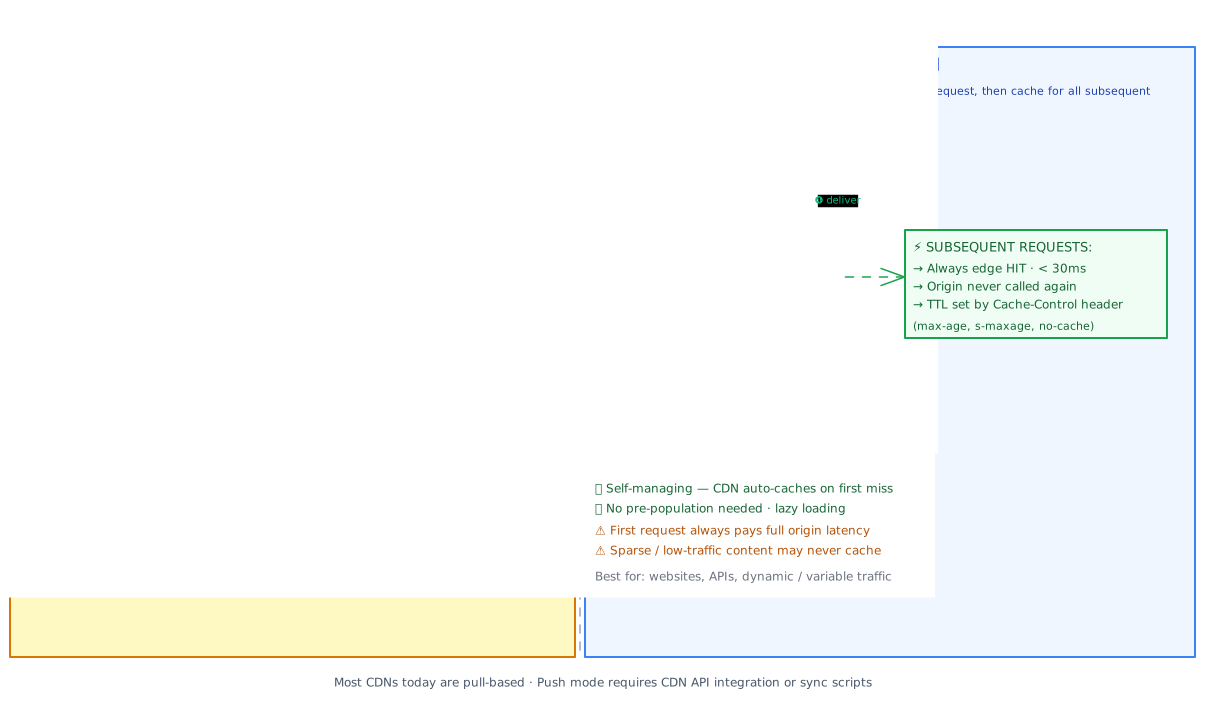
| Dimension | Push CDN | Pull CDN |
|---|---|---|
| How PoPs are populated | You upload content via CDN API at deploy time | CDN fetches from origin on first cache miss, per-PoP |
| First-request latency | Always HIT — content pre-populated | MISS on first request to any PoP → origin latency |
| Origin load | Zero reads after push completes | Origin sees 1 request per PoP per cache miss |
| Management overhead | High — must push on every content update | Low — CDN auto-manages; just set TTL headers |
| Storage cost | Pays for content at every PoP regardless of demand | Only caches content that gets requested |
| Cache invalidation | Delete via CDN API, re-push new version | Wait for TTL or call purge API |
| Best for | Large binaries, video, infrequently changing content | Websites, APIs, dynamic traffic patterns |
Most modern CDNs (Cloudflare, Fastly, CloudFront) operate as pull CDNs by default. Push CDN semantics are used by specialised video delivery networks (Netflix Open Connect) and asset pipelines where guaranteed warmth is required.
Reverse Proxy CDN vs Origin CDN
- Reverse proxy CDN (Cloudflare, Fastly, Akamai) — sits in front of your entire origin. All traffic flows through the CDN; it also provides WAF, DDoS protection, and edge compute. Your origin's IP is hidden from the public internet.
- Origin CDN / object storage CDN (Amazon CloudFront + S3, GCS + Cloud CDN) — your static assets live in object storage; the CDN fronts only the storage bucket. Your application origin is separate and not proxied by the CDN.
CDN is not just for static files
Even for dynamic requests that can't be cached, a reverse proxy CDN still reduces latency via TCP connection reuse and TLS termination at edge. Cloudflare maintains persistent TCP connections to your origin. A user in Tokyo who makes a non-cacheable API request still saves 80–100ms compared to establishing a fresh TCP+TLS connection all the way to your origin. This is why "put everything behind Cloudflare" is commonly good advice even for dynamic applications.
Cache Invalidation
Cache invalidation at CDN scale is harder than at application-cache scale, because you're invalidating potentially 200+ PoPs simultaneously. The standard tools are:
TTL expiry (default, lazy)
Set a short enough s-maxage that stale content expires before it matters. For content updated daily, s-maxage=3600 (1 hour) is usually acceptable.
Users in the worst case see 60-minute-old content. Simple, zero operational overhead, no purge API calls required.
The problem: If you have a production incident and need to push a fix now, you can't wait 60 minutes for TTL to expire. My recommendation here is to always pair TTL caching with a purge pipeline — relying on TTL expiry alone is the mistake I see teams make right before their first 2am emergency rollback. TTL alone is insufficient for emergency deployments.
Content-addressable URLs (best practice for static assets)
Embed a content hash in every static asset filename. The file /static/app.7f3c2a1b.js has the hash 7f3c2a1b derived from the file's contents. When you rebuild, the hash changes: /static/app.d3e9f1a0.js.
The new URL is unconditionally a CDN miss — PoPs don't have it yet. The old URL remains valid for users who haven't reloaded (zero breaking change).
// next.config.mjs — Next.js generates content-hashed asset URLs automatically
// Output: /_next/static/chunks/app.7f3c2a1b.js
// No manual cache-busting needed — the framework handles it.

// For your own build pipeline (e.g., esbuild custom):
import { createHash } from 'node:crypto';
import { readFileSync } from 'node:fs';

function contentHash(filePath: string): string {
  const content = readFileSync(filePath);
  return createHash('sha256').update(content).digest('hex').slice(0, 8);
}

// assets/app.js → assets/app.7f3c2a1b.js
// Cache-Control: public, max-age=31536000, immutable  ← cache forever, no purge needed
This is the correct default for all JavaScript, CSS, fonts, and images. Your CDN can cache these files forever (max-age=31536000, immutable) because the URL changes whenever the content changes.
If your build pipeline doesn't produce content-hashed filenames, fix that before you tune any other CDN setting.
CDN Purge API (emergency invalidation)
Every major CDN provides an API to invalidate cached paths across all PoPs. This is what you call in your deployment pipeline for content that doesn't use content-addressable URLs.
# Cloudflare: purge a specific file after deployment
curl -X POST "https://api.cloudflare.com/client/v4/zones/${ZONE_ID}/purge_cache" \
  -H "Authorization: Bearer ${CF_API_TOKEN}" \
  -H "Content-Type: application/json" \
  --data '{"files":["https://yourapp.com/index.html","https://yourapp.com/api/config"]}'

# Cloudflare: purge by cache tag (requires Enterprise plan — much more surgical)
curl -X POST "https://api.cloudflare.com/client/v4/zones/${ZONE_ID}/purge_cache" \
  -H "Authorization: Bearer ${CF_API_TOKEN}" \
  -H "Content-Type: application/json" \
  --data '{"tags":["product-catalog","blog-posts"]}'
Purge API propagation is not instantaneous
When you call the purge API, propagation across all PoPs worldwide typically takes 1–5 seconds for Cloudflare, 30–60 seconds for CloudFront. During that window, some users will still receive the old cached version. For a rollback scenario, this is fine — the window is short. For compliance-critical content removal (GDPR deletion requests), track propagation and verify completion before confirming deletion.
Use content-hashed URLs for everything static, TTL for semi-static content, and the purge API as your emergency brake — anything else is improvising in production.
Trade-offs
| Pros | Cons |
|---|---|
| Drastic latency reduction for global users — 200–300ms cross-continent trips become 5–30ms PoP hops | Cache invalidation complexity — stale content across 200+ PoPs requires pipeline discipline (content-addressable URLs or purge API) |
| Origin offload — 95%+ of read traffic absorbed at edge; origin infrastructure can be sized for 5× less load | Additional failure surface — CDN misconfiguration can serve stale content globally, or block all traffic if rules are wrong |
| Bandwidth cost reduction — CDN egress is typically cheaper than cloud provider egress ($0.01–0.04/GB vs $0.08–0.09/GB) | No benefit for non-cacheable dynamic content — personalized pages, authenticated API responses, real-time data bypass cache entirely |
| DDoS protection — CDN absorbs volumetric attacks at edge (Cloudflare: 154Tbps network capacity) before traffic reaches origin | Vendor dependency — CDN becomes critical infrastructure; outage or price change has immediate production impact |
Improved availability — PoP redundancy isolates regional failures; if your origin has a brownout, CDN can serve stale content from stale-if-error | Debugging difficulty — cache hits at edge hide origin errors; cf-cache-status: HIT in headers means the user isn't seeing what your origin would send today |
| TLS termination at edge — users get fast TLS handshakes even when origin is distant | Vary header complexity — content negotiation (Accept-Encoding, Accept-Language) creates multiple cache variants per URL; misconfigured Vary bloats CDN storage |
The fundamental tension here is performance vs. consistency. A CDN is explicitly a caching layer between users and your authoritative data. Every performance gain — every cache hit — is served from a copy that might be milliseconds to hours behind the current state at origin. The engineering challenge is choosing, per content type, how stale is acceptable and building the expiry or invalidation mechanics to enforce that bound.
When to Use It / When to Avoid It
So when does this actually matter? My recommendation is to start from "always add a CDN" and then carve out disciplined exceptions — for any app with static content and global users, a CDN is table stakes.
Use a CDN when:
- You serve users in multiple geographic regions and care about first-contentful-paint for each.
- Your application has a significant fraction of static or semi-static content (landing pages, documentation, product images, video).
- You're running on a cloud provider with expensive egress costs — CDN egress is consistently 4–10× cheaper.
- You need DDoS protection without deploying and maintaining your own scrubbing infrastructure.
- Your origin would be exposed directly to the public internet — a reverse proxy CDN hides your origin's IP, significantly raising the cost of targeted attacks.
- Your
p95response time for international users is significantly worse than for users co-located with your origin.
If any two of these conditions apply, the CDN pays for itself — usually inside the first billing cycle.
Avoid (or carefully scope) a CDN when:
- Content is personalised per user — user session data, account pages, shopping carts. These must be
Cache-Control: private, no-storeand will not benefit from CDN caching at all (though TLS termination still helps latency). - You're in the prototype stage. A CDN adds an operational layer that makes debugging harder — HTTP headers, purge pipelines, origin shield config. Measure first, add CDN when latency data justifies it.
- You're serving real-time data (live sports scores, stock ticks) where any staleness is user-visible. TTL-based caching at any layer — including CDN — is actively harmful here.
- Compliance requires absolute certainty that deleted content is gone. CDN caches create a propagation window. For GDPR right-to-erasure scenarios, you need to track and confirm purge completion, not just fire-and-forget.
Put a CDN in front of everything by default — then explicitly opt out for the exceptions.
Real-World Examples
Netflix — Open Connect (Push CDN with hardware appliances)
Netflix delivers 15% of all downstream internet bandwidth globally. They run their own CDN called Open Connect — purpose-built for video delivery — deployed as physical hardware appliances directly co-located inside ISPs and internet exchange points (IXPs). These appliances pre-load the most popular titles for that ISP/region overnight (a push CDN model).
When a subscriber in Brisbane presses play on a popular title, the video stream comes from an Open Connect appliance inside Telstra's network in Brisbane — not from AWS US-East. The appliance saw that title was popular in Brisbane, fetched it overnight, and it's sitting on the local SSD at full quality. The round-trip to the AWS origin is 0ms.
Netflix reports that 95%+ of their streamed bits are served from Open Connect. The lesson: at Netflix's scale, building a proprietary push CDN tuned for one specific content type (large, sequential video files) outperforms generic pull CDNs.
Cloudflare — Reverse Proxy CDN as Infrastructure
Cloudflare operates one of the largest networks in the world — 200+ PoPs, 154Tbps of network capacity — and positions its CDN as a reverse proxy that handles not just caching but also DDoS mitigation, WAF, bot management, and edge compute (Cloudflare Workers). In 2022, Cloudflare mitigated a 26 million requests-per-second DDoS attack — the largest ever at the time — without the target origin experiencing any degradation. The attack was fully absorbed at edge. This is the non-obvious value of a CDN: the capacity margin baked into a network like Cloudflare's means even unprecedented volumetric attacks are absorbed before they reach you. If you're self-hosting, reproducing this would require tens of thousands of servers purely for absorbing attack traffic.
GitHub — CDN for release archives and raw content
GitHub serves hundreds of millions of requests per day for repository raw content, release archives, and avatar images. Raw file content at raw.githubusercontent.com is served through Fastly. Release .tar.gz and .zip archives (which can be gigabytes for large projects) are served through Azure CDN.
Without a CDN, a globally popular open-source project's first release would instantly saturate GitHub's origin bandwidth as package managers worldwide simultaneously download the new version. With CDN, the release archive is fetched from origin once per PoP, then served locally to the thousands of npm install, go get, and pip install calls hitting that PoP.
GitHub's lesson: CDN is essential for any file-hosting scenario where a single popular artifact generates massive geographically distributed simultaneous demand.
How This Shows Up in Interviews
When to bring it up proactively
Draw a CDN in the first pass of any architecture that serves content to global users. Say: "I'd put static assets behind Cloudflare or CloudFront — at a 95% cache hit rate, the origin won't see most of this traffic, and international users get sub-30ms asset delivery instead of 200–300ms." Don't wait to be prompted. In a system design interview, proactively adding a CDN for the right reason (latency + origin offload) signals you think in layers.
Don't draw a CDN box without saying what it caches
A common mistake: drawing "CDN" on a diagram and moving on. An interviewer who knows distributions will ask: "What does your CDN cache and for how long?" If you don't have an answer, it signals you draw cargo-cult architecture. Be ready to say: "Static assets with content-addressed URLs cache indefinitely. The homepage with s-maxage=60 caches at edge for 60 seconds and uses stale-while-revalidate so users never wait for origin. Authenticated API responses are Cache-Control: private, no-store and bypass CDN entirely."
Depth expected at senior/staff level:
- Distinguish
max-age(browser) froms-maxage(CDN) and explain why you'd set them differently on a public API endpoint. - Know both invalidation strategies: content-addressable URLs (filesystem-level, no purge needed) and purge API (for content that can't be URL-hashed, with propagation delay awareness).
- Explain origin shield: why adding a shield node reduces origin fan-out from "one miss per PoP" to "one miss total" and when you need it.
- Address the "CDN down" failure scenario:
stale-if-errordirective lets CDN serve stale content during an origin brownout without 503-ing users. If CDN itself fails, traffic falls back to origin — design your origin capacity with that burst in mind. - Articulate the dynamic content case: even non-cacheable requests benefit from edge TLS termination and persistent TCP keep-alive to origin.
Common follow-up questions and strong answers:
| Interviewer asks | Strong answer |
|---|---|
| "What Cache-Control headers do you set for a JavaScript bundle?" | "public, max-age=31536000, immutable. The filename has a content hash — the URL changes every build. CDN and browsers can cache forever. No purge needed because a new deploy generates a new URL." |
| "How do you invalidate CDN cache after a deployment?" | "For statically built assets, I don't — content-addressed URLs handle it. For the HTML index files and any non-hashed content, I call the CDN purge API as the last step of deployment. For Cloudflare this propagates in ~1–2 seconds globally." |
| "What is origin shield and when do you need it?" | "An origin shield is an intermediate cache tier between PoPs and origin. Without it, a cold deploy causes every PoP worldwide (200+ for Cloudflare) to independently miss and each fetch from origin — a thundering herd at origin level. The shield aggregates those misses so origin gets one request, not 200. I'd add origin shield when deploys cause measurable origin CPU spikes." |
| "Your CDN has a 95% hit rate. What does your origin need to handle?" | "5% of peak traffic. If peak is 100K req/s, origin must handle 5K req/s plus 100% of all write traffic and all authenticated requests. The CDN hit rate is the multiplier — every percentage point of hit-rate improvement is a proportional reduction in origin load. Below 80% hit rate, CDN is barely pulling its weight." |
| "When would you not add a CDN?" | "Personalised content — user feed, cart, account pages — can never be cached and bypasses CDN caching. I still route this through a reverse proxy CDN for TLS termination and DDoS protection, but I don't expect caching benefits. And for real-time data (live scores, stock prices), CDN caching is actively harmful — any TTL introduces staleness that's directly user-visible." |
Test Your Understanding
Quick Recap
- A CDN is a globally distributed caching network that routes users to the nearest Point of Presence, turning 200–300ms intercontinental requests into sub-30ms edge hits for static and semi-static content.
- Routing works via GeoDNS or Anycast — when a user resolves your CDN domain, they receive the IP of the nearest PoP; traffic physically travels a shorter network path.
s-maxageis the key CDN cache duration directive;max-agecontrols browsers; set them independently — public API responses often needmax-age=0, s-maxage=60so browsers always re-request but the CDN serves cached copies.- The safest cache invalidation strategy is content-addressable URLs — filename contains a content hash; new builds produce new URLs, making old cache entries safely ignorable rather than a liability.
- The most dangerous failure mode is serving user-specific content without
Cache-Control: private— a single authenticated response gets cached and served to all subsequent visitors until TTL expires, leaking personal data. - Origin shield protects your origin from cache-miss thundering herds: 200+ PoPs that all miss simultaneously converge on a single shield node that makes one upstream request instead of 200.
- For an interview, the key signal that separates junior from senior answers is specifying what you're caching, the exact TTL and why, which content is explicitly excluded from caching, and how you handle cache invalidation during deployments.
Related Concepts
- Caching — The application-level in-memory cache that sits between your app servers and your database. CDN handles the outermost layer (origin → user); application caching handles the innermost layer (DB → app server). Both apply the same hit-rate compounding math, at different layers.
- Load Balancing — CDN and load balancing are complementary: the CDN routes traffic to the nearest PoP; the load balancer distributes traffic across app server instances behind origin. Geographic routing (CDN) solves latency; instance routing (LB) solves compute capacity.
- Replication — When CDN cache hit rate is insufficient for truly global write-read consistency (e.g., your product feed changes per-region), database replication to regional clusters is the next layer — it's what actually brings authoritative data closer to users, at significantly higher operational cost.
- Rate Limiting — CDN and rate limiting complement each other for security: CDN absorbs and filters volumetric DDoS traffic at edge before it reaches your rate limiter, while your rate limiter handles application-layer abuse (credential stuffing, scraping) that CDN doesn't block.
- Scalability — CDN is the single most cost-effective scalability lever for read-heavy workloads. The 95% hit rate calculation — one percentage point of hit rate = one percentage point less origin load — is the quantitative framework for every CDN sizing conversation.
Related Articles
Learn how caching eliminates redundant database reads, which strategy to choose for your write pattern, and how to design a cache layer that survives invalidation at scale.
Learn how load balancers distribute traffic across servers, which algorithms to choose, and how to design a highly-available app tier in any system design interview.
Learn how databases organize data for fast retrieval, which storage engine to choose for your workload, and how ACID transactions keep concurrent writes correct at scale.
Master how database replication scales reads, survives failures, and trades off consistency for availability. Learn replica lag, read stale data purposefully, and why your most critical business logic must run on the primary.